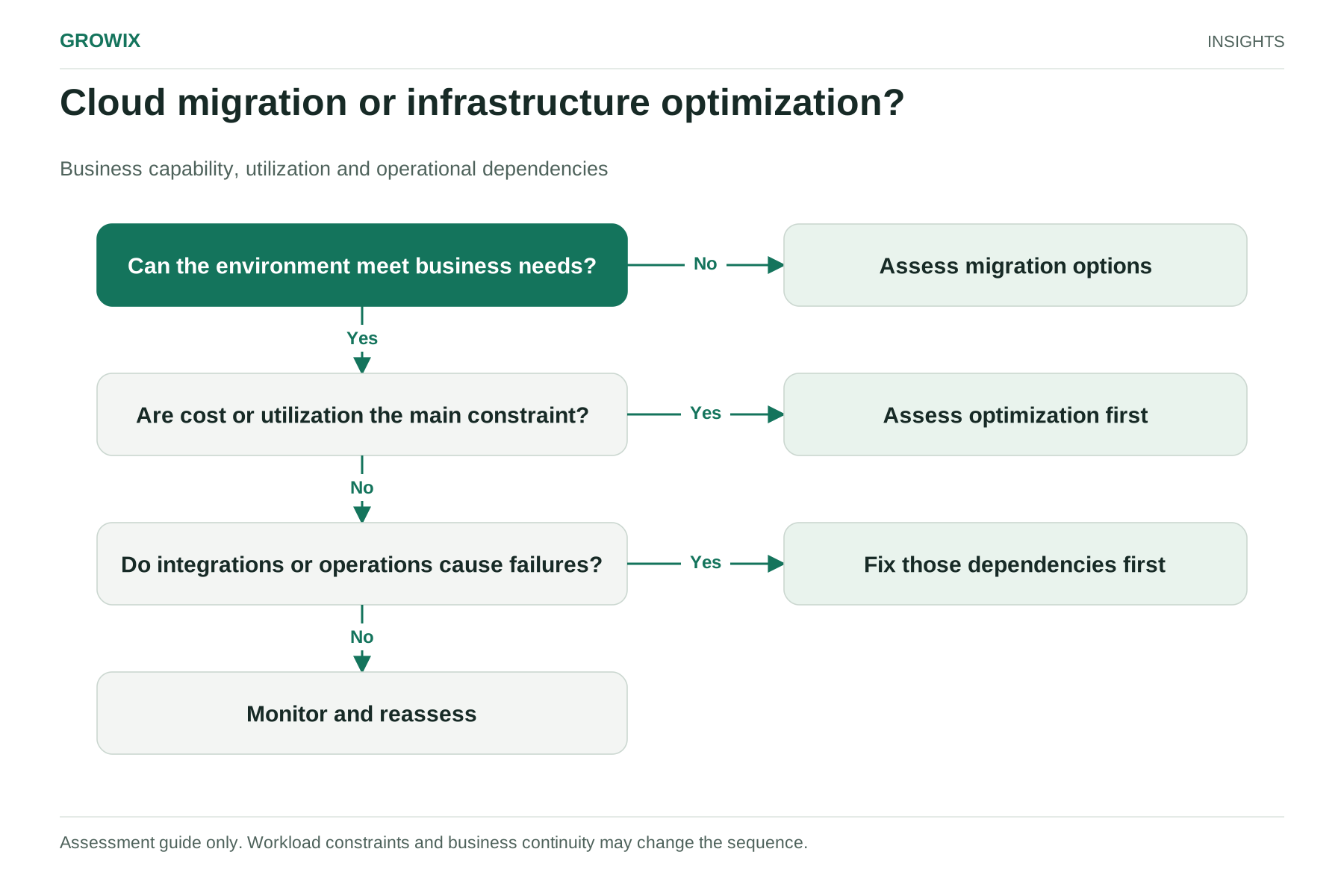
The short answer: optimize first when your current platform is fundamentally adequate but costs too much, performs poorly or is badly managed. Migrate first when the platform itself is the constraint: hardware reaching end of life, a data center contract expiring, capacity you cannot add quickly, or capabilities you cannot get where you are. In practice, most businesses get the best result from a sequence: assess, remove what you do not need, migrate in waves, then optimize again in the new environment.
The rest of this guide explains how to tell which situation you are in, what each path costs, and how to plan the order of work.
What each option means
Cloud migration moves workloads from one environment to another, usually from on-premises servers or a colocation facility to a public cloud such as AWS, Microsoft Azure or Google Cloud, or between clouds. AWS's prescriptive guidance describes seven migration strategies: retire, retain, rehost (lift and shift), relocate, repurchase (replace with a different product), replatform (move with some optimization) and refactor (re-architect for cloud-native features). Two of those seven, retire and retain, mean not moving the workload at all, which is a useful reminder that migration planning is partly a decision about what to stop running.
Infrastructure optimization improves the environment you already have. It covers rightsizing servers and databases, removing idle resources, consolidating workloads, tuning performance, improving monitoring, applying lifecycle rules to storage and, in the cloud, using commitment discounts appropriately. It does not change where workloads run.
Diagnose the constraint you actually have
Start with symptoms, not solutions. The table below links common problems to the constraint behind them.
| Symptom | Likely constraint | Usually start with |
|---|
| Cloud bill rising faster than usage or revenue | Waste, poor allocation, no commitments | Optimization |
| Slow application performance on adequate hardware | Configuration, database tuning, code or architecture | Optimization, then targeted re-architecture |
| Servers or storage reaching end of support | Hardware lifecycle | Migration assessment, with retire and consolidate decisions |
| Data center or colocation contract ending | Facility timeline | Migration, scheduled backward from the exit date |
| Unable to add capacity quickly for growth or peaks | Platform elasticity | Migration of the affected workloads |
| Frequent outages with unclear causes | Monitoring, ownership, change control | Optimization and reliability work first |
| A new capability you need is unavailable where you are | Platform capability | Migration or a hybrid design for that workload |
If several rows apply, the one with a fixed deadline usually wins. An expiring data center contract does not wait for an optimization program to finish.
Compare the costs honestly
The two paths have different cost shapes. Optimization is mostly engineering time and tooling, with savings that start within weeks. Migration carries one-time costs that must be recovered through lower running costs or new business value.
| Cost item | Migration | Optimization |
|---|
| Assessment and planning | Inventory, dependency mapping, cost model | Spend and performance review |
| Engineering effort | Moving, testing and cutting over each workload | Rightsizing, tuning and clean-up |
| Dual running | Paying for old and new environments during transition | Not applicable |
| Data transfer | Moving data in, plus ongoing egress patterns | Not usually significant |
| Licensing | Some licenses change terms or cost in the cloud | Usually unchanged |
| Skills and training | New platform skills for the team | Mostly existing skills |
| Risk | Cutover disruption, unexpected dependencies | Lower, but limited upside if the platform is the problem |
Google Cloud's guidance on assessing workloads before a migration recommends building a total cost of ownership model that compares the target environment with your current costs, including hardware, software and data center operating costs such as power and cooling, and notes that network costs are commonly overlooked.
Hypothetical example: why retiring first changes the payback
These figures are invented to illustrate the arithmetic.
A company spends $30,000 a month to run its current environment. A cloud migration is estimated at $150,000 in one-time project costs, plus $60,000 of extra spend while both environments overlap. After migration, the cloud environment is expected to cost $24,000 a month.
- Migrate everything as is: monthly saving of $6,000; one-time cost of $210,000; payback in 35 months.
- Retire first: an assessment finds that 20% of workloads are unused or duplicated. Retiring them before migration cuts the project and overlap costs by 20% (to $168,000) and the cloud run cost to $19,200 a month. Monthly saving rises to $10,800, and payback falls to about 16 months.
The example assumes on-premises costs disappear once you exit, which is rarely immediate. Hardware leases, support contracts and licenses may run on. Build those dates into your model.
Check dependencies and disruption
The most expensive migration surprises come from dependencies nobody documented: a reporting tool that reads directly from a production database, a batch job that relies on a shared file path, or a partner integration whitelisted to a fixed IP address.
Before choosing a path, confirm:
- Application dependencies: which systems call which, including databases, message queues, file shares and authentication.
- Network and latency needs: workloads that must stay close to each other, or close to users or factory equipment.
- Data residency and compliance: where regulated data may be stored and processed.
- Change windows: when each business area can tolerate downtime or degraded performance.
- Skills: whether your team can operate the target platform safely after go-live.
An IT infrastructure audit or migration assessment should produce this dependency map along with a recommended strategy for each workload.
Questions a good migration assessment should answer
- Which workloads should be retired, retained, rehosted, replatformed or replaced, and why?
- What does each workload cost to run today, and what is the estimated target cost?
- Which workloads must move together because of dependencies?
- What is the critical path to any contract or hardware deadline?
- Which security and compliance controls must be in place before the first production workload moves?
- What will the team need to learn, and who will operate the new environment from day one?
If an assessment cannot answer these, it is a sales proposal rather than a decision document.
Migration is not always toward the cloud
The same reasoning applies in other directions. Some businesses move specific workloads from public cloud back to dedicated or on-premises infrastructure, often called repatriation, when usage is large and steady, data transfer costs are high, or hardware needs are specialized. Others adopt a hybrid design that keeps latency-sensitive systems close to factories, stores or offices while moving everything else. Optimize and measure first in these cases too: a cloud environment that is poorly sized will look expensive compared with almost any alternative, and moving it will not fix the underlying waste.
When each option fits
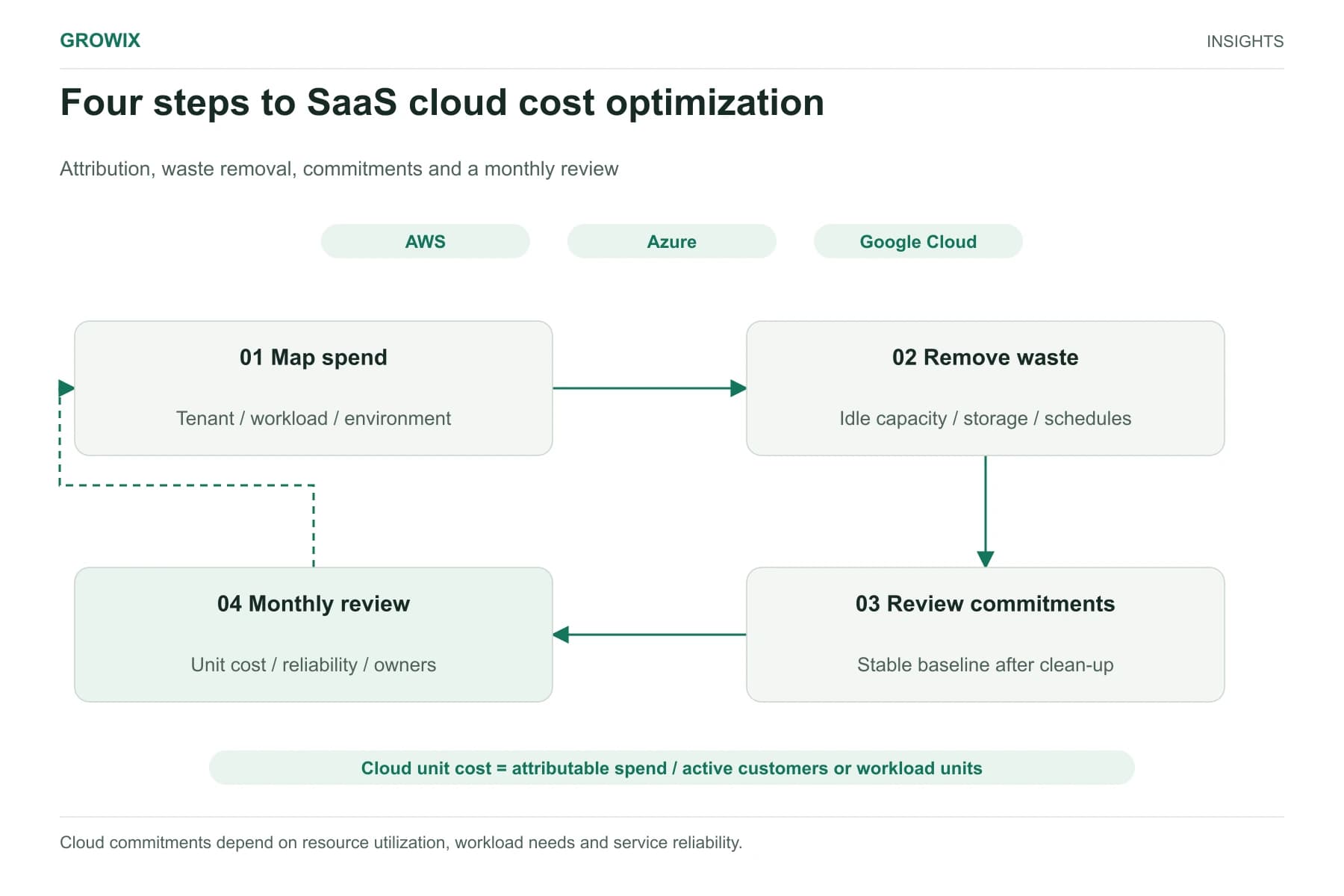
Prioritize optimization when your platform is adequate, the main complaints are cost and performance, there is no fixed facility deadline, and the team lacks visibility into what is running. SaaS teams already in the cloud will find the step-by-step method in our guide to SaaS cloud cost optimization.
Prioritize migration when you face a hardware or facility deadline, need elastic capacity for growth, or need platform capabilities you cannot reasonably build where you are.
Combine them when you have both an approaching deadline and significant waste, which is common. Retire and consolidate during the assessment, migrate in waves, and schedule a post-migration optimization review for each wave.
When Growix may not be the right fit: if the decision is mainly a licensing or commercial negotiation with a single vendor, or you already have a mature platform team and only need a specific tool, a specialist reseller or the provider's own migration program may be more efficient.
Choose an implementation sequence
A practical order for most mid-sized environments:
- Assess: inventory workloads, map dependencies, capture current costs and performance.
- Decide per workload: retire, retain, optimize in place, or migrate with a named strategy.
- Quick optimization: remove waste in the current environment, especially anything you will retire.
- Pilot wave: migrate a low-risk workload to prove tooling, security controls and cutover steps.
- Main waves: migrate in groups that respect dependencies and business change windows.
- Optimize after each wave: rightsize using real usage data, then consider commitments.
- Decommission: shut down and stop paying for the old environment on a written schedule.
Measure progress with the share of workloads with a decided strategy, run cost per workload before and after, incidents during cutover, and the date on which old infrastructure costs actually stop.
Frequently asked questions
What is cloud migration?
Cloud migration is moving applications, data and infrastructure from on-premises servers or a colocation facility to a public cloud such as AWS, Microsoft Azure or Google Cloud, or from one cloud to another. Each workload can be moved as is, adapted or replaced, depending on cost, risk and business value.
What are the main cloud migration strategies?
AWS's prescriptive guidance describes seven: retire, retain, rehost, relocate, repurchase, replatform and refactor. In practice, a good assessment decides a strategy for each workload and starts by retiring what is no longer needed, so you do not pay to move it.
Should you optimize infrastructure before migrating?
Often, yes. Retiring unused workloads and removing obvious waste before a migration reduces project and overlap costs and shortens payback. The exception is a fixed deadline, such as an expiring data center contract or hardware reaching end of life, where migration has to start regardless.
Next step
Growix's Cloud Infrastructure & Architecture team covers cloud migration and implementation as well as infrastructure optimization across AWS, Google Cloud and Azure. If you are not yet sure which constraint you have, an independent review through IT Consulting & Audits produces a prioritized plan before you commit to either path.
Discuss your IT and infrastructure needs