AI Agents for Business: What They Are, Practical Use Cases, Costs and Risks
AI Agents for Business: What They Are, Practical Use Cases, Costs and Risks
An AI agent decides its own next step and uses tools to reach a goal. That makes it powerful for some tasks and expensive or risky for others. Here is how to tell the difference.
An AI agent is software that uses a language model to work toward a goal by deciding its own next steps: it reads the situation, chooses a tool such as a search, a database query or an API call, looks at the result and decides what to do next, repeating until the task is done or it hands over to a person. That ability to plan and act is what separates an agent from a chatbot that only answers questions, and from workflow automation that follows a fixed path.
For businesses, the practical question is not whether agents are impressive. It is which tasks genuinely benefit from software that decides its own steps, and which are better served by simpler, cheaper and more predictable automation. This guide explains what AI agents are, where they are useful today, what they cost and how to start without taking on unnecessary risk.
How an AI agent works
Most business agents combine four parts:
A goal or instruction, such as "prepare a briefing on this prospect" or "resolve this customer's delivery question."
A language model that interprets the goal and decides what to do next.
Tools, meaning the actions the agent is allowed to take: searching approved sources, reading records, calling APIs, drafting messages or updating a system.
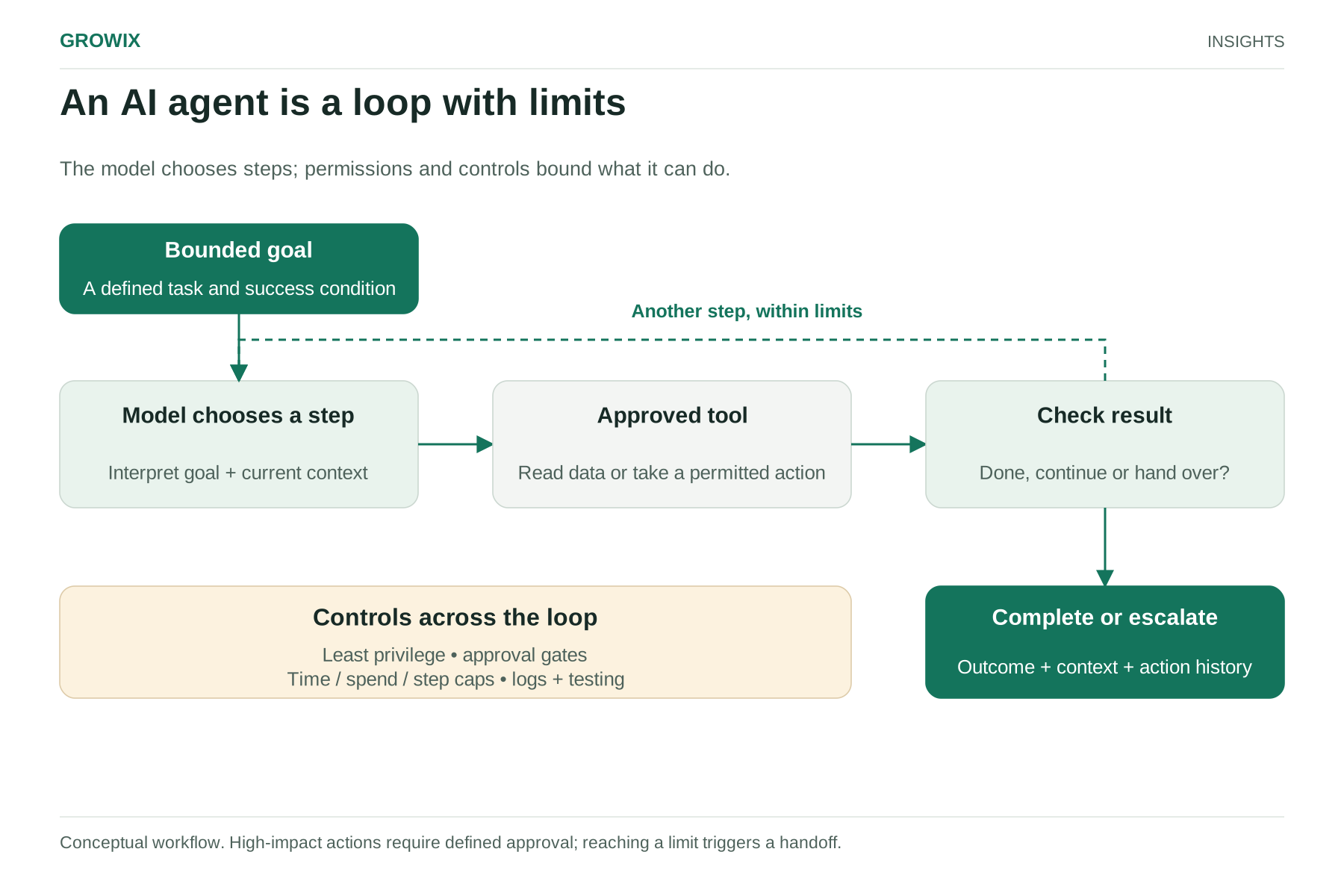
A loop with limits: the agent acts, checks the result and continues until it finishes, reaches a step limit or meets a condition that requires a person.
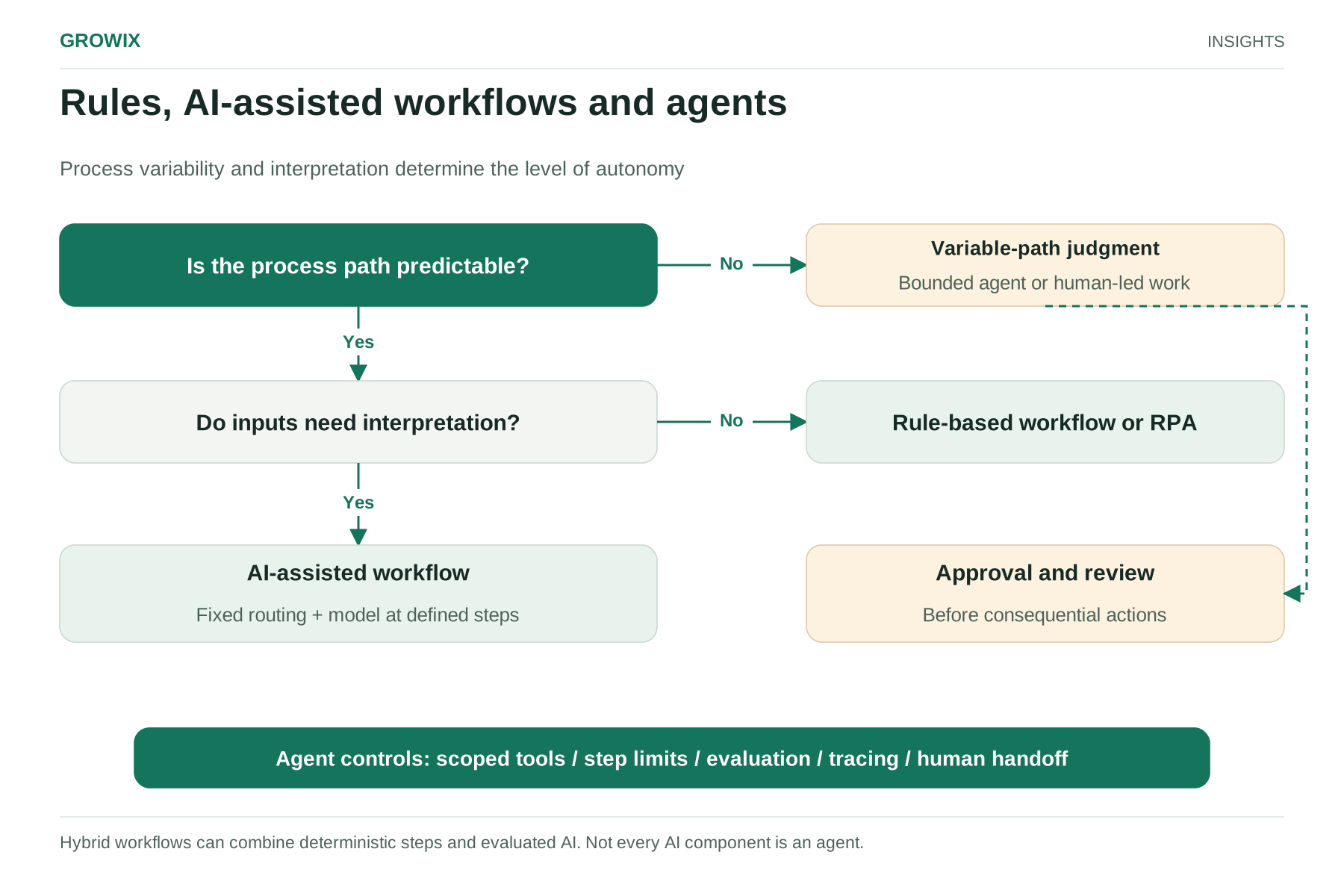
Anthropic's engineering guidance on building effective agents draws a useful distinction: workflows follow predefined code paths, while agents let the model direct its own process and tool use. Many successful business systems combine the two.
An AI agent is a loop with limits. Conceptual workflow. High-impact actions require defined approval; reaching a limit triggers a handoff. View full size
Agents compared with chatbots, assistants and automation
These are generic illustrations of where agents are being applied, not case studies.
Sales: researching a prospect from approved sources and the CRM before a call, and drafting a briefing for the account executive to review.
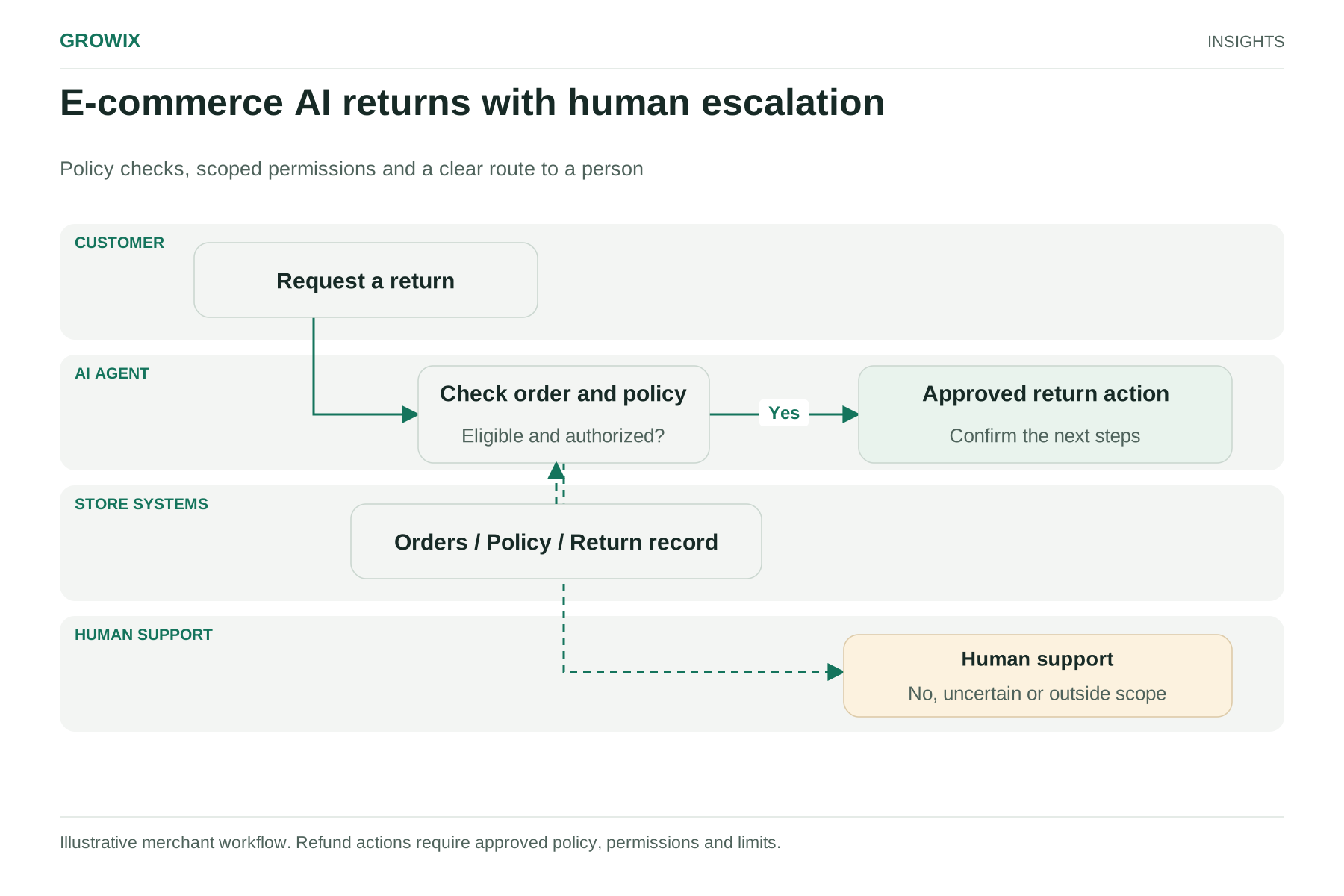
Customer service: answering order and account questions by checking real data, and preparing returns within rules set in code. See our guide to AI in e-commerce for a staged approach.
IT service desk: gathering diagnostic information, checking known issues and suggesting fixes before a ticket reaches a technician.
Finance operations: investigating invoice mismatches across purchase orders, receipts and supplier records, then proposing a resolution for approval.
Recruiting coordination: scheduling interviews across several calendars and following up with candidates.
Internal knowledge: answering employees' questions from policies and documentation, with sources shown.
The common pattern is that the agent prepares, investigates or completes bounded work, while people approve anything consequential.
What AI agents cost to run
Agent costs come from more than the model:
Model usage: agents make several model calls per task to plan, use tools and check results, so they cost more per task than a single chatbot answer.
Tools and data: search services, data storage, integrations and API usage.
Hosting and monitoring: logging each step, tracing failures and measuring quality.
Human review: the time people spend approving actions and handling escalations.
Build and maintenance: prompts, tool definitions, testing and updates as your systems change.
In the worked example in our guide to what AI applications cost to run, moving a question-answering feature to a five-call agent design increased model cost about eightfold before retries. That can be worth it if the agent resolves substantially more tasks, but it needs to be proven with measurement.
Hypothetical value calculation
The following figures are invented for illustration.
An IT service desk receives 1,200 tickets a month. An agent gathers device details, checks known issues and drafts a first diagnosis before a technician opens each ticket. If that saves three minutes per ticket, the time saved is 1,200 × 3 = 3,600 minutes, or 60 hours a month. Compare that with the agent's monthly running and maintenance cost, and check that diagnosis quality is at least as good as before.
Risks and how to control them
Agents act, so their mistakes can have consequences. Common risks include taking the wrong action, acting on manipulated input, exposing data to the wrong person and running up costs in loops.
Practical controls:
Least-privilege tools: give each agent only the actions and data its task needs, read-only by default.
Approval gates: require a person to approve payments, refunds above a limit, external messages and changes to important records.
Hard limits: cap steps, spending and time per task.
Logging and review: record every step and tool call, and review samples regularly.
Testing before release: run the agent against a set of real past cases, including awkward ones, whenever prompts, models or tools change.
Clear escalation: define when the agent must hand over to a person, with full context.
Industry analysts have warned about over-ambitious projects. Gartner predicted in June 2025 that over 40% of agentic AI projects will be canceled by the end of 2027, citing escalating costs, unclear business value or inadequate risk controls. This is a prediction published in 2025, not a measured cancellation rate. Gartner also described "agent washing," where existing chatbots and automation tools are rebranded as agents without substantial agentic capability.
How to start
Pick a bounded task that happens often, takes real time and has a checkable result.
Measure the baseline: how long it takes today, how often it goes wrong, what it costs.
Decide the autonomy level: inform, prepare for approval or act within limits.
Build a small test set from real past cases.
Pilot with a small group for a fixed period, with success criteria agreed in advance.
Expand only on evidence: quality, time saved and cost per completed task.
What decisions does the agent make on its own, and which tools can it use?
How do we limit permissions, set approval gates and cap spending?
Can we see a full log of every step and tool call?
How is quality measured, and can we test it on our own data first?
What does it cost per completed task, not just per user or per month?
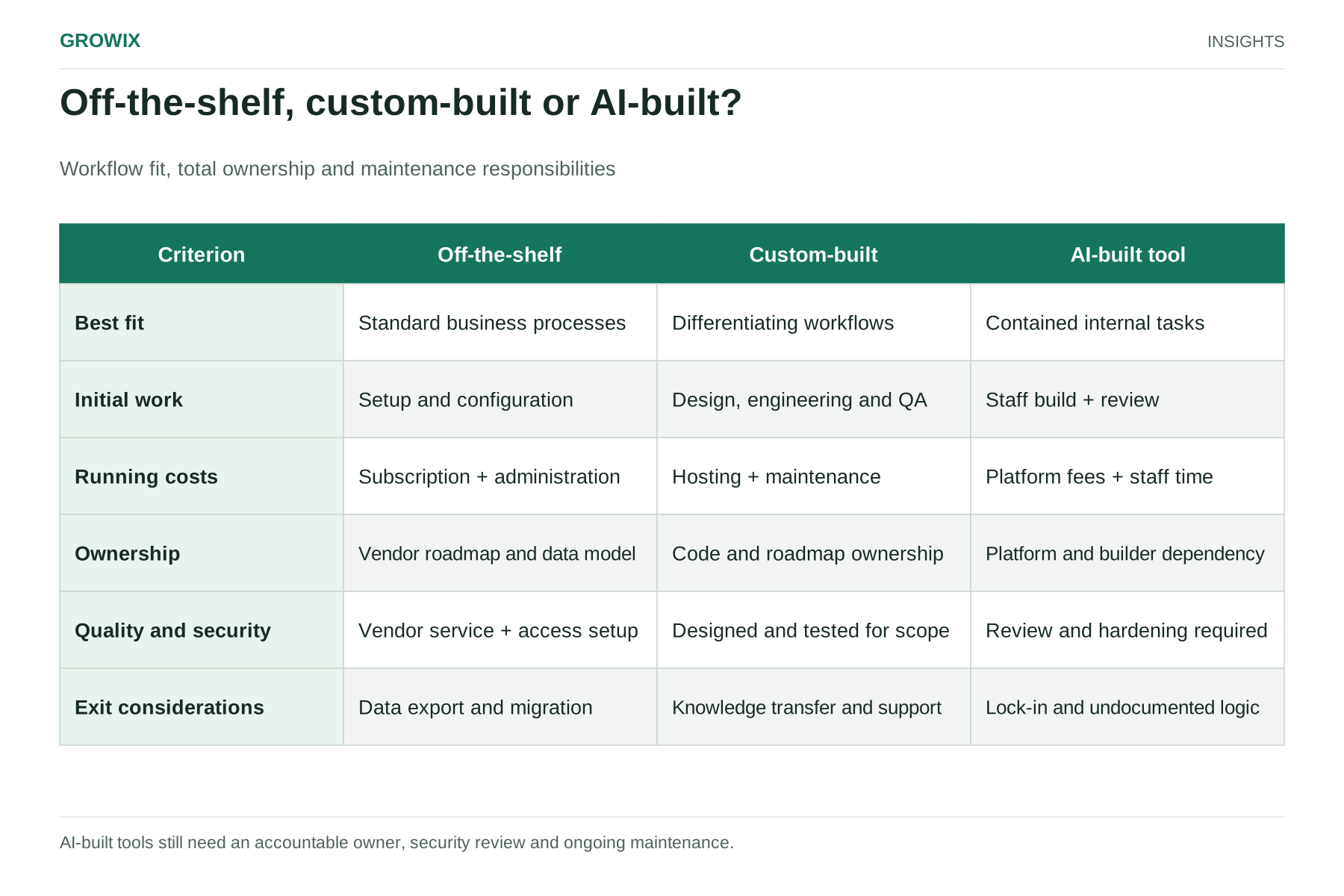
Build, buy or configure?
There are three common routes to an agent:
Features in tools you already use. Many helpdesk, CRM, productivity and commerce platforms now include agent features connected to their own data. They are often the quickest way to start, with less control over behavior and limited reach beyond that platform.
Specialist products for a specific job, such as customer service or sales research. They can be quick to deploy but need careful checks on data access, pricing and how they connect to your systems.
Custom agents built on a model provider's platform, which make sense when the task crosses several of your systems, depends on your own data and rules, or needs tight control over permissions and logging.
Whichever route you choose, the same disciplines apply: a defined task, limited permissions, measured quality and a clear point where people take over.
Frequently asked questions
What is an AI agent?
An AI agent is software that uses a language model to pursue a goal by deciding its own next steps and using tools, such as searching, reading records or calling APIs, until the task is complete or it hands over to a person.
What is the difference between an AI agent and a chatbot?
A chatbot answers questions within a conversation. An agent can plan a sequence of actions and use tools to complete a task, such as looking up an order, checking a policy and preparing a return for approval.
Are AI agents safe to use in business?
They can be, with limits: narrow permissions, approval for consequential actions, caps on steps and spending, full logging and testing on real cases before release. Start with tasks where mistakes are cheap and easy to catch.
Next steps
List three tasks your team repeats every week that require looking things up in several systems. Score each on frequency, time spent and the cost of a mistake. The highest-scoring, lowest-risk task is usually the right first candidate for an agent, or for simpler automation.
Growix's AI Development & Integration team builds AI assistants, agents and intelligent automation into the systems you already run, with the evaluation and guardrails that keep them reliable in production.