The short answer: most business processes are best served by workflow automation that follows a fixed path, with AI used at specific steps to handle unstructured input such as emails, documents or free-text requests. AI agents, which decide their own steps and choose which tools to use, are worth their extra cost and risk only when the path to a good result genuinely varies from case to case and mistakes can be caught before they matter.
The choice is less "agents or automation" than "how much decision-making should software take over at each step." This guide defines the options, compares how they cost and fail, shows hybrid examples and gives you a checklist for choosing.
The options defined
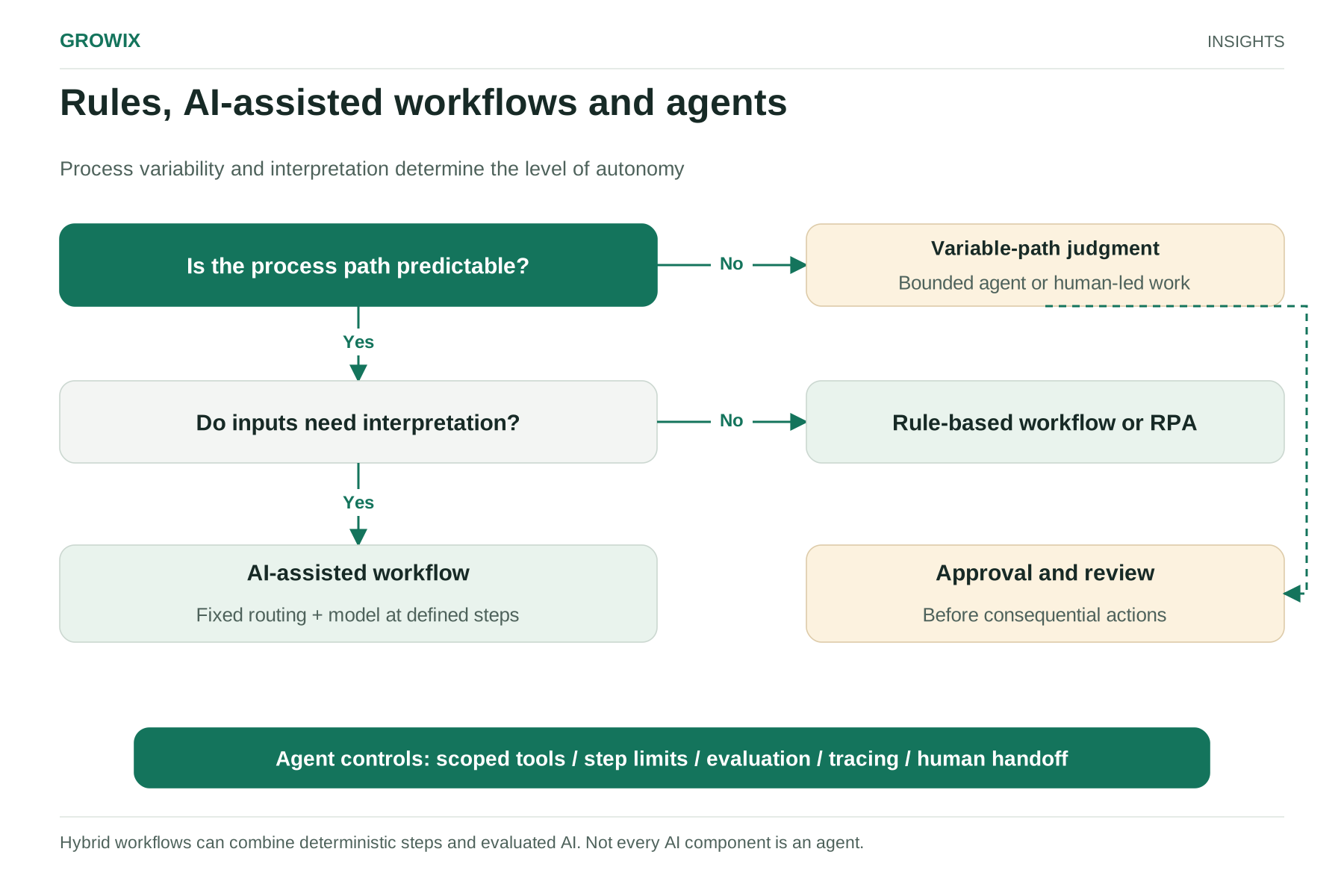
Rule-based workflow automation moves work through predefined steps: when a form is submitted, create a record, notify a team, wait for approval, update another system. Integration platforms and business process tools do this well. Behavior is predictable and easy to audit.
Robotic process automation (RPA) uses software bots to mimic a person's clicks and keystrokes in applications, usually where no API exists. It is deterministic like workflow automation, but brittle when screens change.
AI-assisted workflows keep a fixed path but add a model at particular steps: classify an incoming email, extract fields from an invoice, draft a reply for review. The model handles the messy input; the workflow controls what happens next.
AI agents let a language model direct the process itself. Given a goal, the agent decides which steps to take, calls tools such as search, databases or APIs, evaluates results and continues until it judges the task done.
Anthropic's engineering guidance on building effective agents draws the same line: workflows are systems where models and tools are orchestrated through predefined code paths, while agents are systems where models dynamically direct their own processes and tool use. It advises finding the simplest solution possible and increasing complexity only when needed, noting that agentic systems often trade latency and cost for better task performance.
How they compare
| Factor | Rule-based workflow or RPA | AI-assisted workflow | AI agent |
|---|
| Handles unstructured input | No | Yes, at defined steps | Yes |
| Handles variable paths | Only paths you designed | Only paths you designed | Yes, within its tools and permissions |
| Predictability | High | High for routing; output quality varies | Lower; the path itself varies |
| Cost per run | Very low | Low to moderate (model calls at set steps) | Higher (multiple model calls, growing context) |
| Typical failure | Breaks on unexpected input or a changed screen | Misclassifies or extracts wrongly | Takes a wrong path, loops, or acts on bad reasoning |
| Auditability | Straightforward | Straightforward, plus model outputs to log | Requires detailed tracing of each step |
| Build and maintenance | Configure and maintain rules | Rules plus prompts and evaluation | Tools, permissions, evaluation and monitoring |
Cost differences can be large. In our worked example on AI application running costs, moving the same question-answering feature from a single model call to a five-step agent raised model costs eightfold, before retries. That can be worthwhile, but only if the agent resolves noticeably more cases.
Separate deterministic steps from judgment steps
Break the process into steps and label each one:
- Deterministic: the right action follows from clear rules. Example: an invoice over $10,000 needs a second approver.
- Interpretation: the input is unstructured but the decision is simple once understood. Example: identifying the supplier and amount on a scanned invoice.
- Judgment: the right next step depends on context that varies. Example: investigating why a supplier's invoices no longer match purchase orders.
Deterministic steps belong in rules. Interpretation steps are where models add the most reliable value inside a workflow. Judgment steps are candidates for an agent, or for a person supported by AI.
Hybrid workflow examples
These examples are generic illustrations, not client case studies.
Accounts payable intake. A workflow receives invoices by email. A model extracts supplier, amount, dates and line items. Rules match them against purchase orders and route exceptions to a person. No agent is required; the variability is in the document, not the process.
Inbound lead handling. A model classifies inquiries by service interest and urgency and drafts a reply. Rules assign the lead to the right salesperson and create CRM records. A person reviews drafts for high-value inquiries.
IT service desk triage. A model categorizes tickets and suggests knowledge-base articles. Rules route by category and priority. An agent with read-only access to system status and logs gathers diagnostic information for the engineer, but does not change any configuration.
Account research before a sales call. An agent searches approved sources, reads the prospect's public materials and CRM history, and compiles a briefing. The path genuinely varies by account, mistakes are reviewed before use, and the agent takes no external action. This is a good agent use case.
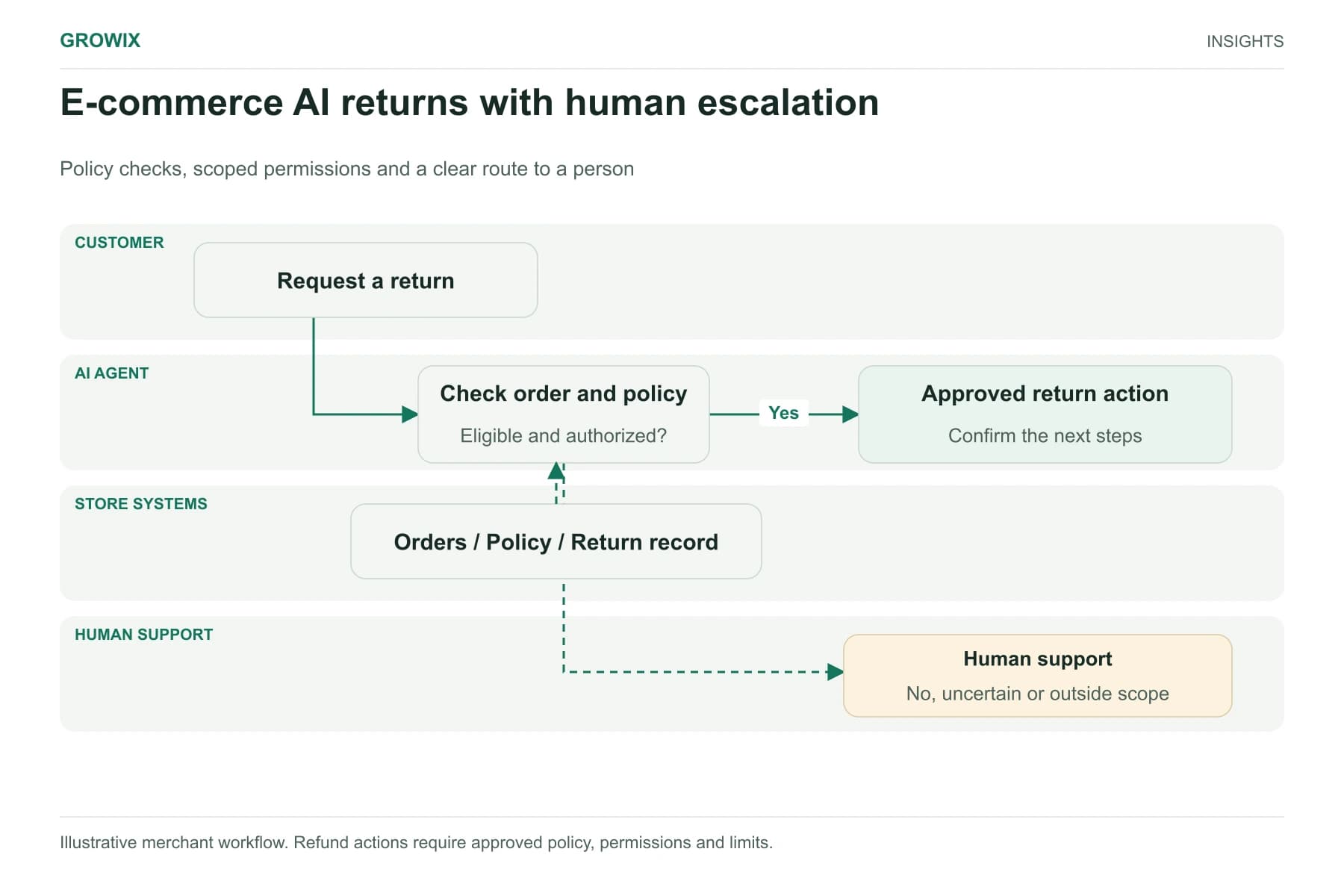
Customer refunds. A workflow checks eligibility rules and processes refunds below a threshold. Anything above it, or anything unusual, goes to a person. Letting an agent decide refunds based on its own judgment is rarely justified. Our guide to AI agents for e-commerce covers how to tier autonomy for customer-facing actions.
Where RPA fits now
RPA is still useful where a necessary system has no API and cannot be replaced soon, such as an older line-of-business application or a supplier portal. Its weakness is fragility: a changed button label or page layout can stop a bot. Adding AI does not remove that weakness, although models can help bots cope with variable documents. If a process depends heavily on screen automation, check whether the vendor now offers an API or whether a systems integration would be more durable.
Compare running costs with the work removed
Every option should be judged against the human effort it removes and the errors it prevents, not against zero. A hypothetical comparison, with invented figures, makes the point.
A team processes 2,000 supplier invoices a month. Manual handling takes about six minutes each, or 200 hours a month. An AI-assisted workflow that extracts data and routes exceptions might cut handling to one minute for straightforward invoices and leave 15% as exceptions needing full review. That is roughly 28 hours for the 1,700 straightforward invoices and 30 hours for the 300 exceptions, about 58 hours in total, plus model and platform costs. An agent might reduce exceptions further, but only if it investigates mismatches more accurately than the rules and people it replaces. Measure that before paying for the extra autonomy.
Choose autonomy and review controls
If you do use an agent, design its limits before its capabilities:
- Permissions: give the agent only the tools and data scopes its task needs. Read-only by default.
- Approval gates: require human approval before actions that send external communications, move money or change records customers see.
- Step and cost limits: cap the number of steps and tokens per task to stop loops.
- Escalation: define when the agent must stop and hand over, with its work so far attached.
- Tracing: log every step, tool call and result, so you can explain any outcome.
- Evaluation: test against realistic cases, including adversarial inputs, before launch and after each change.
A decision checklist
Answer these for the process you are considering:
- Can you draw the process as a flowchart that covers 90% of cases? If yes, start with workflow automation.
- Is the main difficulty understanding messy input? If yes, add AI at that step within a workflow.
- Does the right sequence of steps change substantially from case to case? If yes, an agent may help.
- Can errors be caught before they reach customers, money or records? If not, keep a person in the decision or reduce autonomy.
- Is the volume high enough that the cost per run matters? If yes, favor deterministic steps and smaller models wherever possible.
- Do you have evaluation data to prove the agent is better? If not, run a bounded pilot before committing.
A process that scores "agent" on question 3 but fails question 4 is a candidate for an agent that prepares work for a person, not one that acts alone.
When each option fits, and when Growix may not
Workflow automation fits structured, repetitive processes with clear rules, such as approvals, notifications, record creation and data synchronization.
AI-assisted workflows fit processes with unstructured inputs but predictable handling, such as document intake, classification and drafting.
Agents fit open-ended tasks like research, investigation and multi-system information gathering, where the output is reviewed before anyone acts on it.
When Growix may not be the right fit: if your process is simple and your team can configure it in an off-the-shelf integration tool, doing it yourself is usually the most economical option. Bringing in a development partner makes more sense when processes span several systems, need custom APIs, or require evaluation and guardrails for AI steps.
Frequently asked questions
What is the difference between AI agents and workflow automation?
Workflow automation follows a fixed path defined in advance, so it is predictable, cheap to run and easy to audit. An AI agent lets a language model decide which steps to take and which tools to use, which handles varied cases but costs more per task and needs stronger controls.
What is AI workflow automation?
AI workflow automation keeps a fixed, rule-based process but uses a model at specific steps to handle unstructured input, such as extracting fields from an invoice, classifying an email or drafting a reply for review. For most business processes, it is the right first step before considering agents.
When is RPA still the right choice?
Robotic process automation is useful where a necessary system has no API and cannot be replaced soon, such as an older line-of-business application or a supplier portal. Because bots depend on screen layouts, they break when interfaces change, so treat RPA as a bridge rather than a foundation.
Next step
Map one process step by step, label each step deterministic, interpretation or judgment, and run the checklist. The result usually shows where AI belongs and where it does not.
Growix's AI Development & Integration team builds AI assistants, agents and intelligent automation with evaluation and guardrails, and our Custom Software Development team builds the workflows and internal platforms they run within.
Discuss your software or AI project