IT Infrastructure Lifecycle Management for Manufacturers: Planning Server, Network and End-of-Support Upgrades
Plants often run on servers and network gear long past their support dates. Build an inventory, rank risk by production impact, and plan refreshes around shutdowns and budgets.
Manufacturing sites are good at maintaining machines. They are often less consistent about the servers, switches, firewalls and PCs that keep those machines scheduled, monitored and connected to the business. A server under a desk in the plant office runs the label printing. A ten-year-old switch connects the production floor to the ERP system. A workstation that runs the quality inspection software cannot be updated because nobody is sure the software will still work.
None of this is unusual, and much of it runs reliably for years. The risk arrives quietly: a vendor stops issuing security updates, a disk fails with no spare available, or a cyber incident spreads through equipment nobody remembered to patch. IT asset lifecycle management is the discipline of knowing what you have, how long it will remain supported and when it needs replacing, so that upgrades happen on your schedule rather than in an emergency.
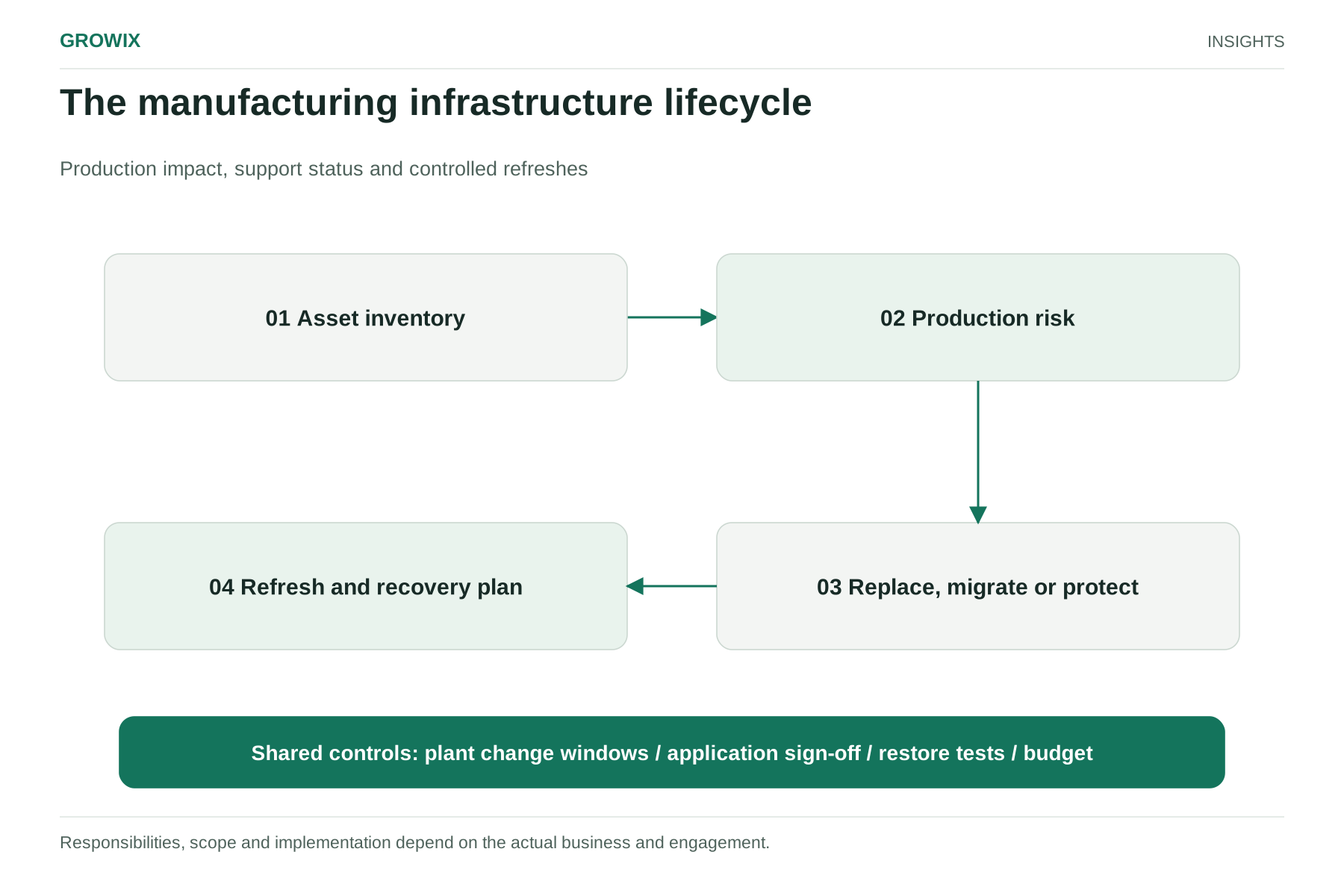
This guide shows manufacturers how to build an infrastructure inventory, rank risk by production impact, plan refreshes around shutdowns and budgets, and measure whether the program is working.
Servers of that generation are common in plants because they were installed alongside production systems around the time the operating system was current. If you have any, the decision about whether to upgrade, migrate, isolate or buy extended updates needs to be made in the next few months, not after the date passes.
Operating systems are only one category. Network equipment, firewalls, storage, virtualization platforms, databases and industrial software all have their own support lifecycles, often controlled by different vendors.
Step 1: Build an infrastructure inventory
You cannot plan a lifecycle for equipment you do not know about. Start with a single inventory covering every server, network device, storage system and business-critical workstation across all sites.
Field
Why it matters
Asset and location
Plant, line, room or rack, so people can find it
Function
What it does, such as ERP database, label printing, historian, file shares
Business owner
The person who can say what happens if it stops
Hardware model and age
Warranty status, spare parts availability
Operating system and version
End-of-support date
Key applications and their vendors
Whether those vendors support newer platforms
Network zone
Office network, production network, or both
Backup status
Whether it is backed up and when a restore was last tested
Support contract
Hardware maintenance, software subscription, renewal date
End-of-support date
For hardware, operating system and key software
Gather the data from several sources: network and endpoint management tools where they exist, vendor portals, purchase records and, unavoidably, walking the plant. Equipment in production areas is often missing from central records because it was bought by engineering or a machine supplier rather than IT.
Keep the inventory in one place with a named owner. A spreadsheet is acceptable to start; what matters is that it is maintained.
Step 2: Rank risk by production impact
Not every out-of-date asset needs the same urgency. Score each one on two dimensions.
Likelihood of a problem: age and warranty status, whether security updates are still available, known reliability issues, spare parts availability and how exposed it is on the network.
Impact if it fails: whether production stops, slows or continues; how long recovery would take; whether quality, safety or compliance records depend on it; and how many sites or lines it affects.
A simple matrix helps:
Low impact
High impact
High likelihood
Plan replacement this year
Act now: replace, isolate or add protection
Low likelihood
Monitor; replace at normal end of life
Plan replacement and test recovery
High-impact assets on the production side deserve particular care. Changes near production control systems can affect equipment and safety, so involve controls or operational technology engineers in any change there. NIST's Guide to Operational Technology Security (SP 800-82 Rev. 3) is a useful reference for the security side of connecting business and production networks.
Step 3: Decide the right action for each asset
For each high-priority asset, choose one of five actions:
Upgrade in place: move to a supported version of the operating system or software, if the applications support it.
Replace: new hardware and a supported platform, often the cleanest path for aging physical servers.
Isolate and protect: when an application cannot run on a newer platform, restrict network access tightly, remove unnecessary connections, monitor closely and plan a longer-term replacement of the application itself.
Buy time: extended support or extended security updates from the vendor, used as a bridge with a defined end, not as a permanent state.
The application vendor usually decides which options are available. Contact vendors early: some quality, labeling and machine-interface software is certified only on specific operating system versions, and getting a supported upgrade path can take months. If the software itself is the obstacle, our guide to legacy software modernization for manufacturers covers the application side.
Step 4: Plan refreshes around production and budget
Lifecycle work fails when it competes with production. Build the plan around the plant's calendar.
Use planned shutdowns for changes that affect production systems, and book IT work into the shutdown plan alongside mechanical maintenance.
Avoid peak periods and month-end or quarter-end close for changes to ERP and finance systems.
Prepare and test in advance: build and test replacement systems before the change window, so the window is used for cutover rather than troubleshooting.
Have a rollback plan: keep the old system available until the new one is proven.
Spread spending: a rolling three- to five-year refresh plan avoids the large, unplanned capital requests that follow a crisis.
Hypothetical example: a two-plant components manufacturer
The following example is invented for illustration.
A manufacturer with two plants finds 46 servers and network devices in its inventory, 11 more than its IT records showed. Six servers run an operating system approaching end of support, including the server hosting its label printing and shipping software. Two core switches on the production network are past the manufacturer's end-of-sale date, with spare parts becoming hard to find.
Ranking by impact puts the label printing server and the core switches first, because both would stop shipments. The company confirms that the label software vendor supports a newer operating system, schedules the server replacement for the December shutdown, and orders replacement switches for the same window, with the old switches kept as spares. Four lower-impact servers are virtualized over the following quarter, and the remaining end-of-support server, which runs an unsupported test application, is isolated on its own network segment while the quality team evaluates replacements.
The manufacturing infrastructure lifecycle. Responsibilities, scope and implementation depend on the actual business and engagement. View full size
Protecting systems you cannot replace yet
Some assets will stay in service past their support dates because a machine, a certified process or a vendor depends on them. Reduce the risk deliberately rather than hoping nothing happens:
Segment the network so the system can reach only what it needs, and nothing on the office network can reach it unnecessarily.
Remove internet access and unnecessary remote-access tools.
Restrict accounts to named people with strong authentication, and remove shared logins.
Back up the system and its configuration, and test a restore onto spare hardware.
Monitor it, with alerts for unusual logins, new connections and disk or hardware warnings.
Record the exception with an owner, the reason and a review date, so it does not become permanent by default.
Budgeting a rolling refresh
A predictable refresh program is easier to fund than a series of emergencies. Group assets by expected replacement year, attach an estimated cost from current quotes, and present finance with a three- to five-year schedule. Separate capital items, such as servers and switches, from operating items, such as support contracts, subscriptions and extended security updates. Review the schedule annually: some assets will last longer than planned, while vendor announcements may bring others forward.
Responsibilities and dependencies
Role
Responsibility
IT lead or managed provider
Inventory, monitoring, patching, refresh planning and execution
Plant or operations manager
Change windows, production priorities, acceptance
Controls or OT engineering
Any change touching production equipment or networks
Application owners
Vendor contact, testing and sign-off
Finance
Capital planning and support contract renewals
Dependencies to track include vendor certification of software on new platforms, hardware lead times, shutdown calendars and support contract renewal dates.
Measures of success
Coverage: percentage of infrastructure assets in the inventory with an owner and end-of-support date.
Exposure: number of business-critical assets running unsupported software or hardware, trending toward zero.
Patch currency: share of systems with current security updates.
Recovery readiness: share of critical systems with a tested restore in the last year.
Unplanned downtime caused by infrastructure failures.
Budget accuracy: refresh spending versus plan, with fewer emergency purchases.
Frequently asked questions
What is IT asset lifecycle management?
IT asset lifecycle management is the practice of tracking every server, network device, storage system and critical workstation from purchase to retirement: what it runs, who owns it, when support ends and when it should be upgraded, replaced or retired. Its purpose is to replace emergencies with planned, budgeted refreshes.
What are the stages of the IT asset life cycle?
A common way to describe it is plan and procure, deploy, operate and maintain, upgrade or refresh, and retire and dispose. In manufacturing, the operate and refresh stages need extra care because changes near production systems must fit around shutdowns and involve controls engineers.
When does Windows Server 2016 reach end of support?
Microsoft has stated that Windows Server 2016 reaches the end of extended support on January 12, 2027. After that date, systems still running it need an upgrade, replacement, migration, isolation or a paid extended security update arrangement.
What if equipment cannot be replaced before support ends?
Reduce the risk deliberately: segment the network so the system reaches only what it needs, remove internet access and unnecessary remote tools, restrict accounts, keep tested backups and spares, and record the decision with an owner and a review date.
Next steps
Start the inventory this month, beginning with servers and network devices that production depends on, and check every operating system against its vendor's lifecycle page. If any business-critical systems run Windows Server 2016 or older, put a decision on them on the agenda before the end of the year.
Growix's IT Infrastructure Management service administers servers and technology assets across their full lifecycle, from provisioning through upgrades to retirement. If you want an independent view of where your risks are before committing to a plan, our IT Consulting & Audits team reviews your environment and produces a prioritized plan.