For a SaaS company, cloud cost optimization is not about producing the smallest possible invoice. It is about making the cost of serving each customer fall, or at least hold steady, as the business grows. A bill that rises 30% while revenue rises 60% may be healthy. A flat bill while customer count shrinks is not.
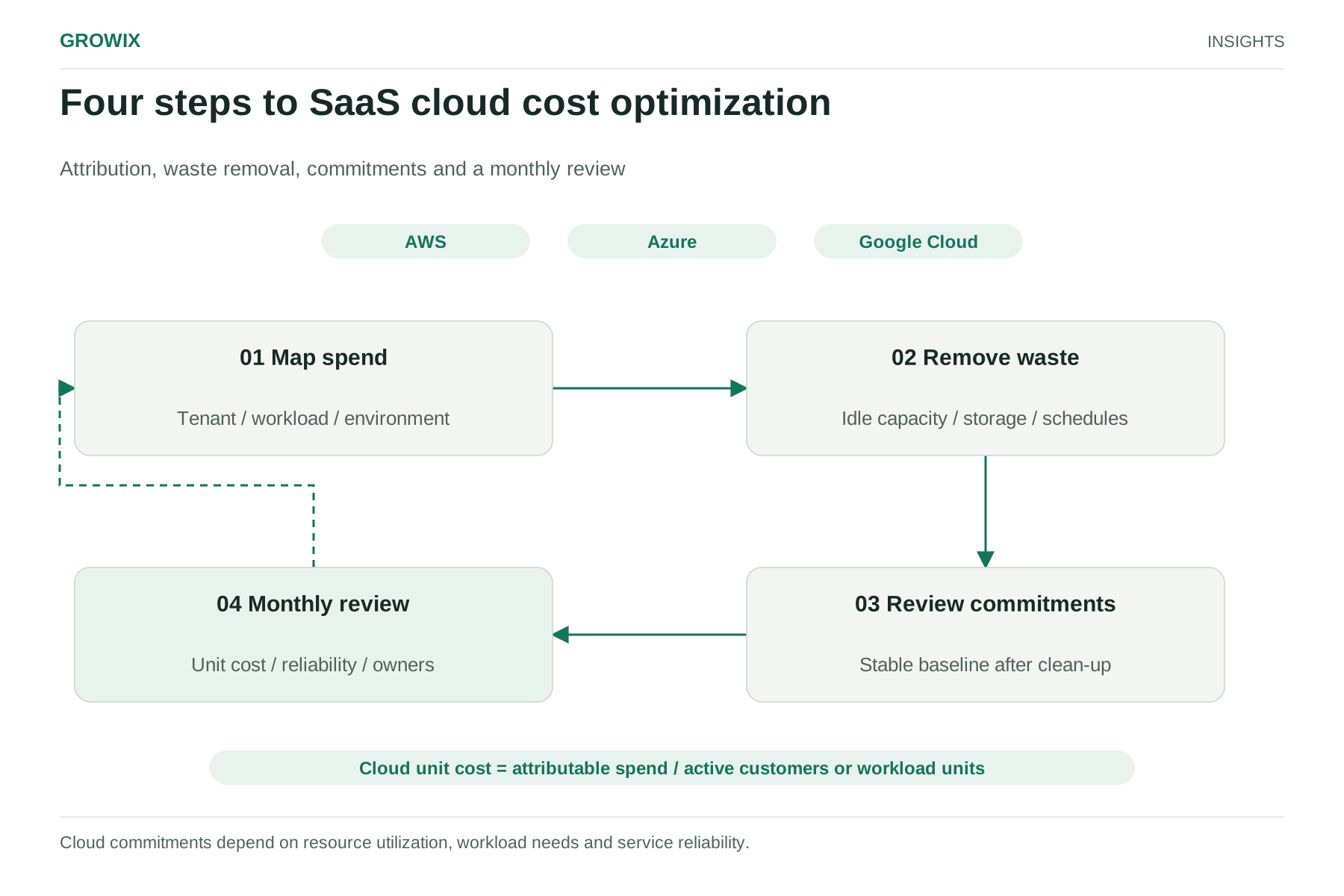
This guide sets out a four-step method that works whether you run on AWS, Microsoft Azure, Google Cloud or a mix: map spend to tenants and workloads, remove waste, decide on commitment discounts only after the waste is gone, and run a short monthly review so the savings last.
Why SaaS cloud costs drift upward
SaaS architectures share infrastructure across many customers, which makes cost both efficient and hard to see. A few patterns appear again and again:
- Shared resources hide the expensive customers. One tenant running heavy reports or large imports can drive database and compute costs that every other tenant appears to share equally.
- Non-production environments multiply. Staging, QA, demo and per-developer environments often run around the clock, even though people use them for a fraction of the week.
- Data grows without a retention decision. Logs, backups, snapshots and object storage accumulate because nobody owns the decision to delete or archive them.
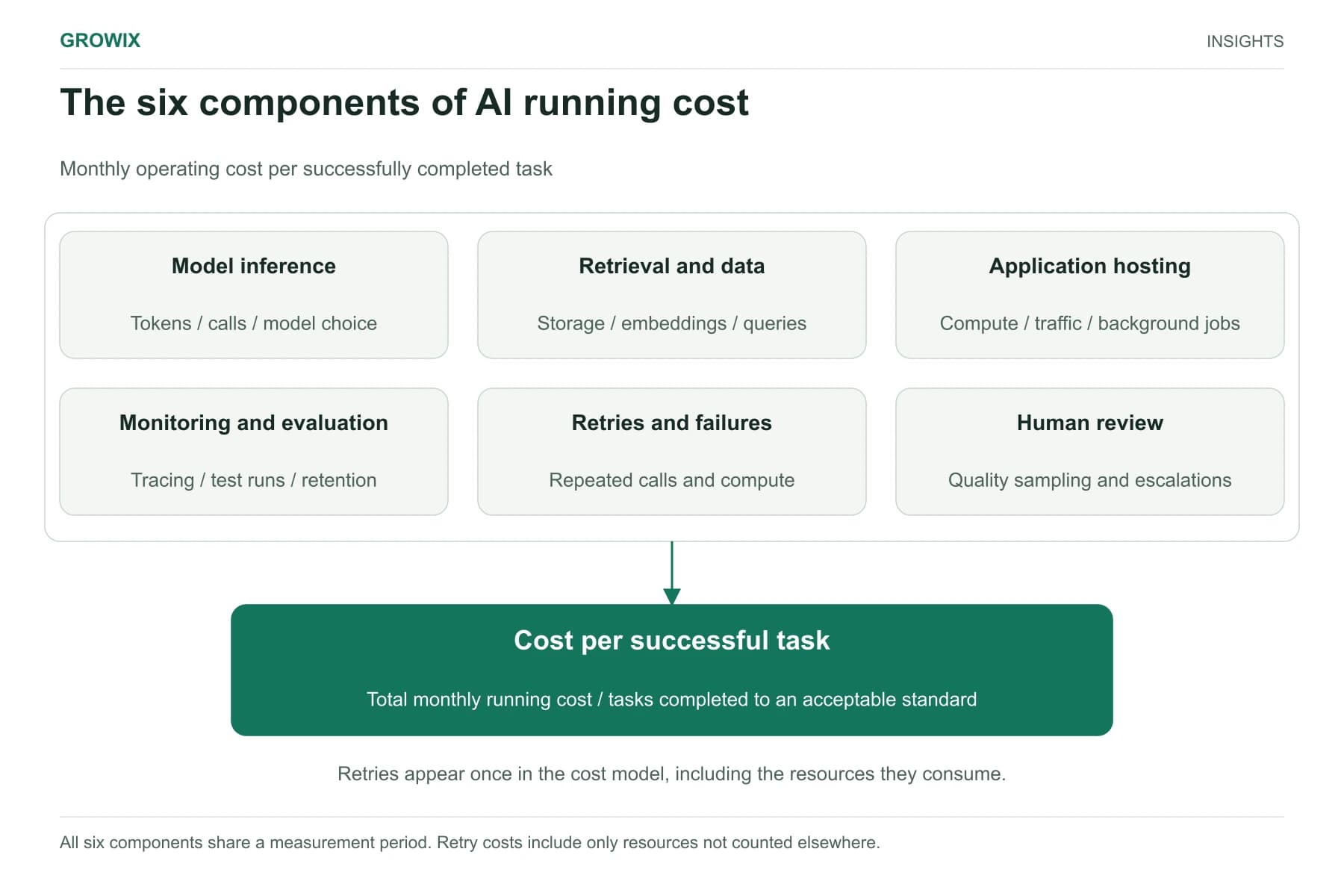
- New AI features add a cost line with different behavior. Model calls and GPU capacity scale with usage patterns, not server counts. If your product now includes AI features, model them separately; our guide to what an AI application costs to run covers that in detail.
These issues are common across the industry. In the FinOps Foundation's State of FinOps 2026 survey of 1,192 practitioners (a global sample representing more than $83 billion of annual cloud spend), workload optimization and waste reduction remained the top current priority, and 98% of respondents said they now manage AI spend, up from 63% the year before. Practitioners also reported diminishing returns once the obvious waste is gone, which is why the process below puts measurement and governance alongside clean-up.
Step 1: Map spend per tenant and workload
You cannot reduce what you cannot attribute. Before changing anything, build a view that answers three questions: what each product workload costs, what each environment costs, and roughly what each customer or customer tier costs to serve.
Tag and label consistently. Agree a short set of required tags (or labels, in Google Cloud) such as environment, service, team and, where the architecture allows it, tenant or tier. Enforce them in infrastructure-as-code so new resources cannot be created untagged. Each provider supports cost allocation by these keys in its native billing tools: AWS Cost Explorer and cost allocation tags, Azure Cost Management, and Google Cloud Billing reports.
Allocate shared costs with a stated rule. Most multi-tenant spend cannot be tagged to a single customer. Choose an allocation driver that reflects consumption, such as API requests, active seats, stored gigabytes or compute seconds per tenant from your application metrics, and write the rule down. A reasonable rule applied consistently is more useful than a perfect rule nobody maintains.
Pick one or two unit metrics. Common choices for SaaS are:
| Unit metric | Good for | Watch out for |
|---|
| Cloud cost per active customer | Board and finance reporting | Hides large differences between plans |
| Cloud cost per 1,000 API requests or transactions | Usage-based products | Needs reliable request counts by tenant |
| Cloud cost as a percentage of revenue | Gross margin discussions | Moves with pricing changes, not just efficiency |
| Cost per environment | Engineering ownership | Says nothing about customer profitability |
Start with whichever metric your finance and engineering leads both accept. The trend matters more than the absolute figure.
Step 2: Find waste before you buy commitments
The fastest savings usually come from stopping payment for capacity nobody uses. Work through the categories below in order, because each one is cheap to check.
| Waste category | Where to look | Native tooling |
|---|
| Idle and orphaned resources | Unattached volumes, unused IP addresses, old load balancers, forgotten test clusters | AWS Trusted Advisor and Compute Optimizer; Azure Advisor; Google Cloud Recommender |
| Overprovisioned compute and databases | Instances and database tiers running well below CPU and memory capacity for weeks | Same rightsizing recommendations, checked against your own peak data |
| Always-on non-production | Staging, QA, demo and developer environments running nights and weekends | Scheduled start and stop, or scale-to-zero where the platform supports it |
| Storage without lifecycle rules | Old snapshots, backups beyond retention policy, infrequently accessed objects in hot tiers | Lifecycle policies and storage-class tiering on each provider |
| Log and telemetry volume | Debug-level logs in production, duplicate shipping to several tools, long retention by default | Sampling, retention limits and routing low-value logs to cheaper storage |
| Data transfer | Cross-region or cross-zone traffic, egress to third-party tools, chatty services | Billing line items by usage type; architecture review |
Two cautions apply. First, treat provider recommendations as a starting list, not instructions. A rightsizing suggestion based on average CPU can be wrong for a service with sharp daily peaks. Second, involve the engineers who own each service. Many "unused" resources turn out to be disaster-recovery replicas or quarterly batch infrastructure.
Step 3: Compare usage savings with rate savings
There are two ways to pay less: use less (usage optimization) or pay a lower price for what you use (rate optimization). Both matter, but the order matters more.
Rate optimization means committing to a level of spend or capacity in exchange for a discount. AWS says its Savings Plans can save up to 72% compared with On-Demand prices, and Azure and Google Cloud offer their own reservation, savings plan and committed-use programs. The maximum discounts apply to specific terms and payment options, so check the current terms for the services you actually run.
The risk is committing to waste. If you buy a one- or three-year commitment that covers today's bloated baseline, you lock in spend you were about to remove.
Hypothetical worked example
The figures below are invented to show the order of operations. They are not benchmarks or Growix results.
Assume a B2B SaaS company spends $80,000 a month on cloud and serves 400 active customers, a cost of $200 per customer. Compute is $44,000 of the total, of which $12,000 is non-production environments running 24 hours a day, seven days a week.
- Usage first. The team schedules non-production to run 12 hours a day on weekdays only. That is 60 of 168 weekly hours, so roughly 64.3% of those hours are removed. Saving: about $7,714 a month ($12,000 × 0.643).
- Then rate. The remaining production compute has a steady baseline of about $30,000 a month. The team commits to cover 70% of that baseline ($21,000 of on-demand-equivalent usage). Assuming an effective discount of 30% on the covered portion (an assumption for illustration, well below the advertised maximum), the saving is $6,300 a month.
- Result. Monthly spend falls from $80,000 to about $65,986. Cost per customer falls from $200 to about $165.
Had the team committed first against the full $44,000 of compute, part of the commitment would have covered non-production hours they later switched off. Leaving 30% of the baseline uncovered also preserves flexibility if the architecture changes.
Questions to answer before committing
- Is the baseline stable after waste removal, measured over at least several weeks?
- Is a major architecture change planned, such as moving to containers, serverless or a different database?
- Who will monitor commitment utilization and coverage each month?
- Does finance prefer paying upfront for a deeper discount, or protecting cash?
Step 4: Build a monthly cost review
Savings fade when nobody owns them. A 45-minute monthly review is usually enough for a growing SaaS business. Keep the attendees small: an engineering lead, someone from finance and, when product decisions affect cost, a product manager.
A practical agenda:
- Unit metric trend for the last three months, with an explanation of any change.
- Top five cost movements by service or account, each with an owner.
- Anomalies flagged by budget alerts or the providers' anomaly detection tools.
- Commitment utilization and coverage, plus anything expiring in the next 90 days.
- Status of open optimization actions, then new actions with an owner and a date.
Set budget alerts by environment and service so that surprises surface within days, not at month end. Record decisions not to act, too. "We are keeping the second region warm for contractual recovery targets" is a legitimate decision that should not be re-debated every month.
Responsibilities and exceptions
Cloud cost work fails when it belongs to everyone. A simple split:
- Engineering service owners fix waste in their services and review rightsizing changes.
- A platform or infrastructure lead maintains tagging standards, scheduling, commitments and the cost dashboards.
- Finance owns the forecast, budget thresholds and commitment purchase approvals.
- Product decides on pricing or plan limits when a feature's cost to serve outgrows what customers pay.
Some cases need a different approach:
- Enterprise single-tenant deployments should be costed per contract, and the cost model should inform renewal pricing.
- Data residency or compliance commitments can justify duplicate infrastructure that looks like waste on a dashboard.
- Early-stage products with unpredictable usage usually benefit more from waste removal and alerts than from long commitments.
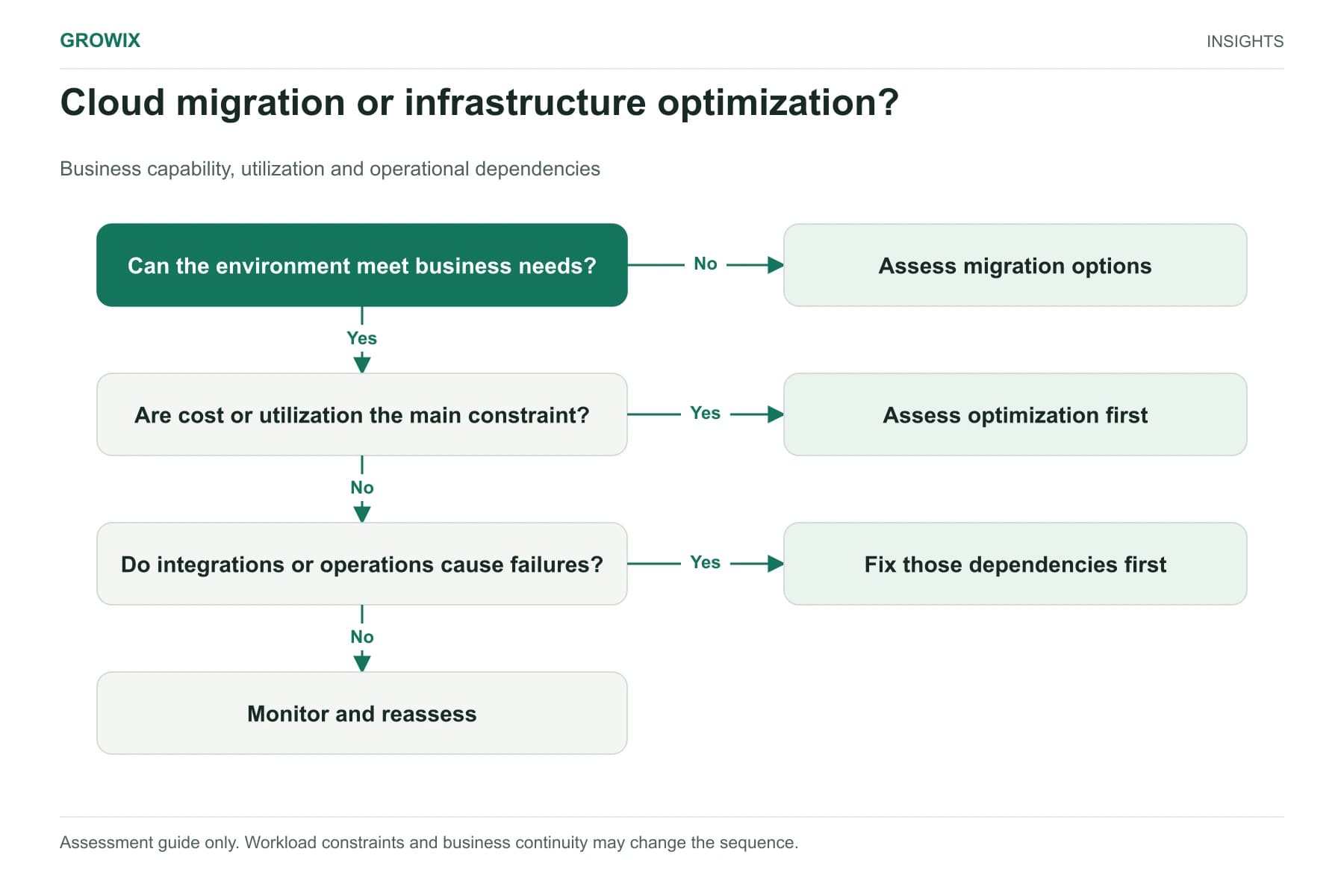
- Multi-cloud estates need one normalized cost view before cross-provider comparisons mean anything. If you are also weighing whether to move workloads, read cloud migration vs infrastructure optimization first.
How to measure success
Judge the program on a small set of indicators reviewed every month:
- Unit cost trend: cost per customer, per transaction or as a percentage of revenue.
- Allocated spend: the share of the bill attributed to a service, environment or tenant. Unallocated spend is where waste hides.
- Commitment utilization and coverage: how much of what you committed to is used, and how much steady usage is still on demand.
- Anomaly detection time: how long it takes for an unexpected cost spike to reach an owner.
- Action completion: how many agreed optimization actions are closed on time.
A falling unit cost with steady reliability is the outcome to look for. A falling bill paired with more incidents or slower releases means the cuts went too deep.
Common mistakes to avoid
- Cutting reliability to hit a number. Removing redundancy or backups saves money until the first incident.
- Optimizing only compute. Databases, logging, data transfer and third-party observability tools can together exceed compute spend.
- Treating cost as a finance-only metric. Engineers make most decisions that drive cost, so they need to see the numbers in their own dashboards.
- One-off clean-ups. A big clean-up without tagging enforcement and a monthly review usually drifts back within a few quarters.
Frequently asked questions
What is cloud cost optimization?
Cloud cost optimization is the ongoing practice of matching cloud spend to the value it delivers: attributing costs to services and customers, removing idle or oversized resources, and paying lower rates for steady usage through commitment discounts. For a SaaS business, the goal is a stable or falling cost to serve each customer, not simply the smallest possible bill.
How can a SaaS company reduce cloud costs quickly?
The fastest savings usually come from using less, not from discounts. Schedule non-production environments to run only when people use them, delete unattached storage and old snapshots, set retention rules for logs, and rightsize clearly oversized resources with the engineers who own them. Enforcing tags and budget alerts at the same time keeps the savings visible.
Should we buy Savings Plans or reserved capacity first?
Usually not. Commitments lower the price of what you use, so buying them before removing waste locks in spend you were about to cut. Remove waste first, measure the remaining baseline for several weeks, then commit to cover part of the steady baseline rather than all of it.
What are the best practices for SaaS cloud cost optimization?
Tag resources consistently, allocate shared costs with a written rule, track one or two unit metrics such as cost per customer, review costs monthly with engineering and finance, and make cost visible in the dashboards engineers already use. Avoid cuts that weaken backups, redundancy or monitoring.
Where to start this month
If you only do three things in the next 30 days, enforce tagging on new resources, schedule non-production environments, and set budget alerts by service. Those three changes create the visibility needed for every later decision.
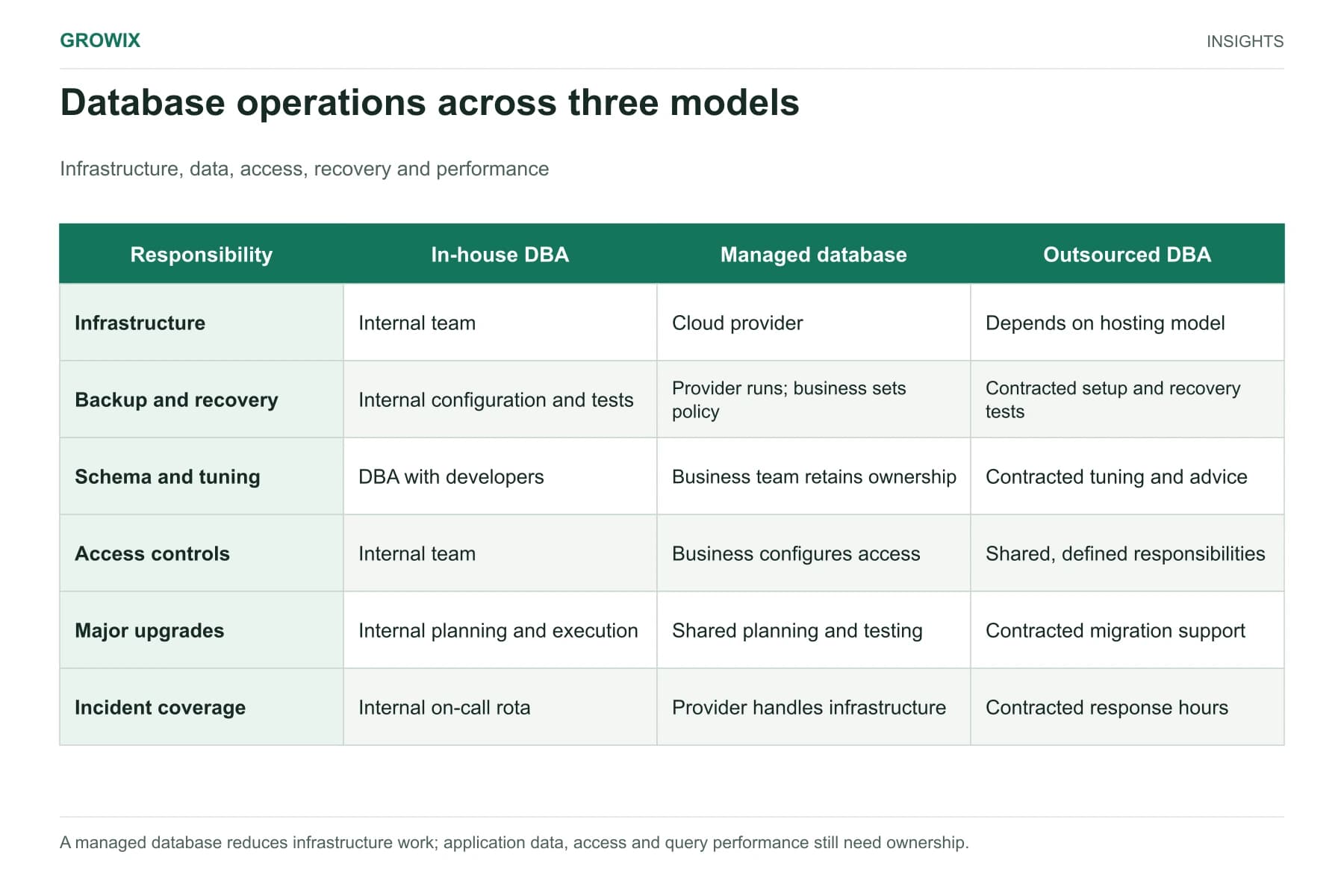
Growix's Cloud Infrastructure & Architecture team designs and optimizes AWS, Azure and Google Cloud environments with cost governance built in. If you want an independent view of where your spend is going before you change anything, our IT Consulting & Audits service reviews the environment and produces a prioritized plan. If database operations are part of the cost question, see in-house DBA vs managed database.
Discuss your IT and infrastructure needs
Sources