AI Integration for SaaS Products: Data, Architecture and Quality Testing
Most SaaS AI features fail on task choice, tenant data and testing, not on the model. A four-stage method for shipping AI features customers trust and keep using.
Adding a language model call to a SaaS product takes an afternoon. Shipping an AI feature that customers use every week, that never shows one customer another customer's data, and that keeps working when the model provider has a bad day takes considerably more planning.
AI integration in SaaS succeeds or fails on four things, in this order: choosing a user task worth improving, preparing the data the feature needs without breaking tenant boundaries, fitting the feature into your existing architecture, and testing quality, latency and fallback behavior before and after launch. This guide works through each.
Stage 1: Select a useful user task
Start from a job your users already do in your product, not from a capability of the model. Good candidates have four characteristics:
Frequent: users do the task weekly or daily.
Tedious but checkable: it takes time to do, but users can quickly tell whether the result is right.
Data already in your product: the inputs live in your system, so you are not asking users to paste context.
Low cost of a wrong answer: a mistake is visible and easy to correct, at least for the first release.
Summarizing activity, drafting a first version of a routine document, classifying incoming items, extracting fields from uploaded files and answering "how do I" questions from your help content often meet these criteria. Autonomous actions that change customer data, send messages on the user's behalf or make financial decisions usually do not, at least not as a first feature.
Write a one-page feature definition
Before engineering starts, agree a short definition with product, engineering and support:
Field
Example
User and moment
Project manager preparing for a Monday status meeting
Input
Tasks, comments and status changes from the last seven days in one project
Output
A five-bullet summary with links to the underlying items
Success criteria
Reviewers rate at least 8 in 10 summaries as accurate and useful
Failure cost
Low; the user reads the summary before sharing it
Fallback
Show the normal activity feed with a short notice
Out of scope
Sending the summary automatically; projects with more than 2,000 updates in v1
This document becomes the basis for your evaluation set in stage 4.
Stage 2: Prepare retrieval data and access
Most SaaS AI features need context from the customer's own data. This is where multi-tenant products face risks that single-company tools do not.
Keep tenant boundaries absolute
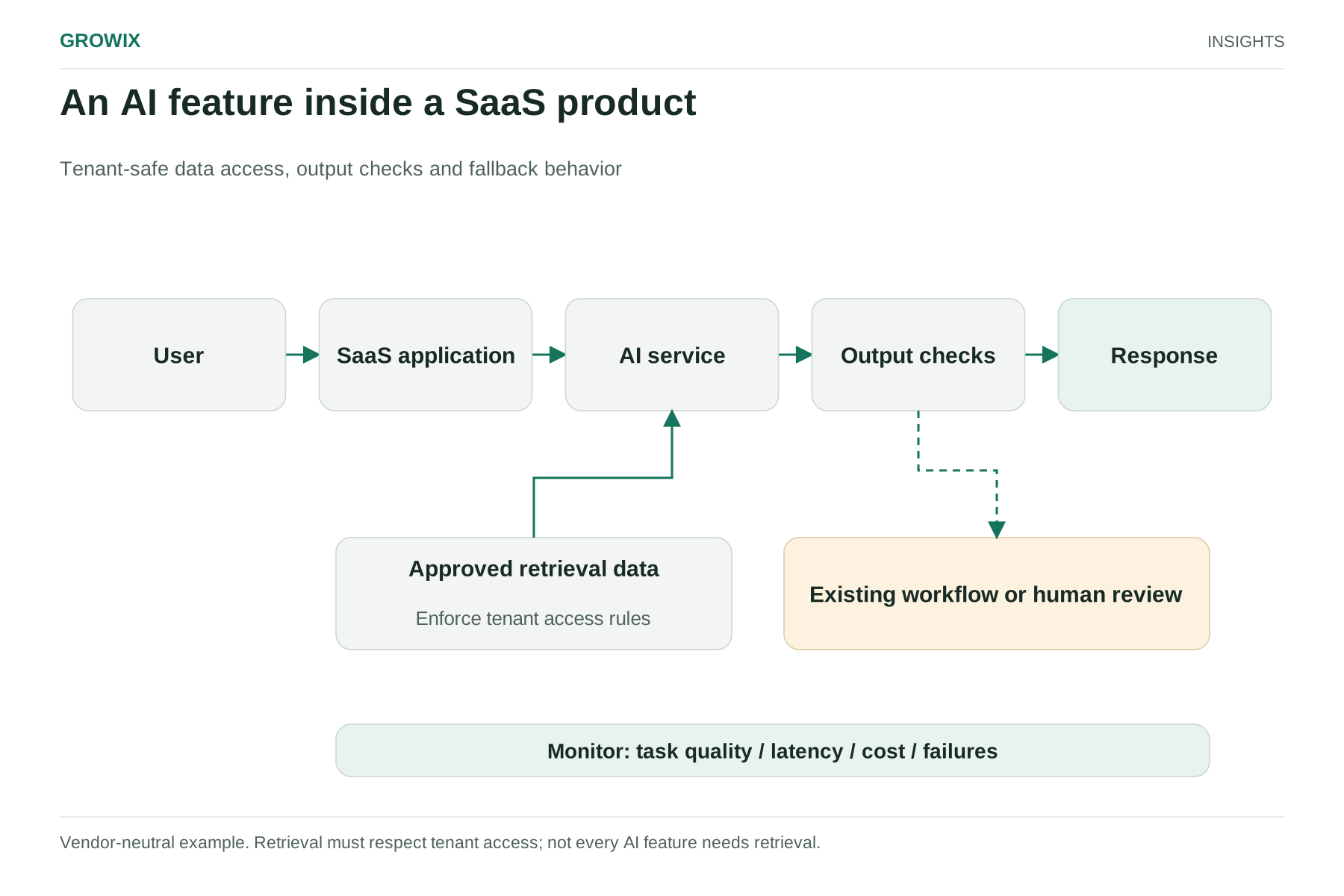
If your feature retrieves documents, records or embeddings to build a prompt, every retrieval query must be filtered by tenant, and ideally by the requesting user's permissions within that tenant. Apply the filter in your data layer or search service, not in the prompt. Instructions such as "only use this customer's data" are not an access control.
Practical safeguards include:
Storing the tenant identifier on every indexed chunk and enforcing it in every query.
Using separate indexes or namespaces per tenant where volume allows.
Respecting object-level permissions, so a user who cannot see a document in the interface cannot receive it through an AI answer.
Automated tests that try to retrieve another tenant's data and must fail.
Decide what data the model may see
Review your customer contracts, data processing agreements and privacy notices before sending customer data to a model provider. Questions to settle include which sub-processors you need to disclose, whether the provider may retain or train on API data under your agreement, where processing happens, and whether some customers need an opt-out or a regional option. Remove or mask fields the task does not need.
Keep context fresh and relevant
Retrieval quality usually matters more than model choice. Decide how quickly changes in the product must appear in AI answers, re-index on change rather than on a slow schedule where freshness matters, and store links back to source items so the interface can show where an answer came from.
Stage 3: Integrate with your existing architecture
Treat the model like any other external dependency: useful, sometimes slow and occasionally unavailable.
Use a thin model gateway. Route all model calls through one internal service that handles authentication, provider selection, retries, timeouts, logging and cost tracking. It lets you change models or providers without touching every feature.
Choose synchronous or asynchronous deliberately. Interactive features such as drafting or question answering benefit from streaming responses. Heavier jobs such as summarizing large projects or processing uploaded files belong in a background queue with a notification when done.
Attribute cost and usage per tenant. Record tokens, latency and outcome per request with tenant and feature identifiers. This is how you set plan limits, spot abuse and decide pricing. Our guide to AI application running costs shows how to model the full monthly cost.
Set per-tenant limits. Quotas and rate limits protect you from one customer's automation consuming capacity meant for everyone.
Ship behind feature flags. Release to internal users, then a beta cohort, then by plan or region, with the ability to switch off quickly.
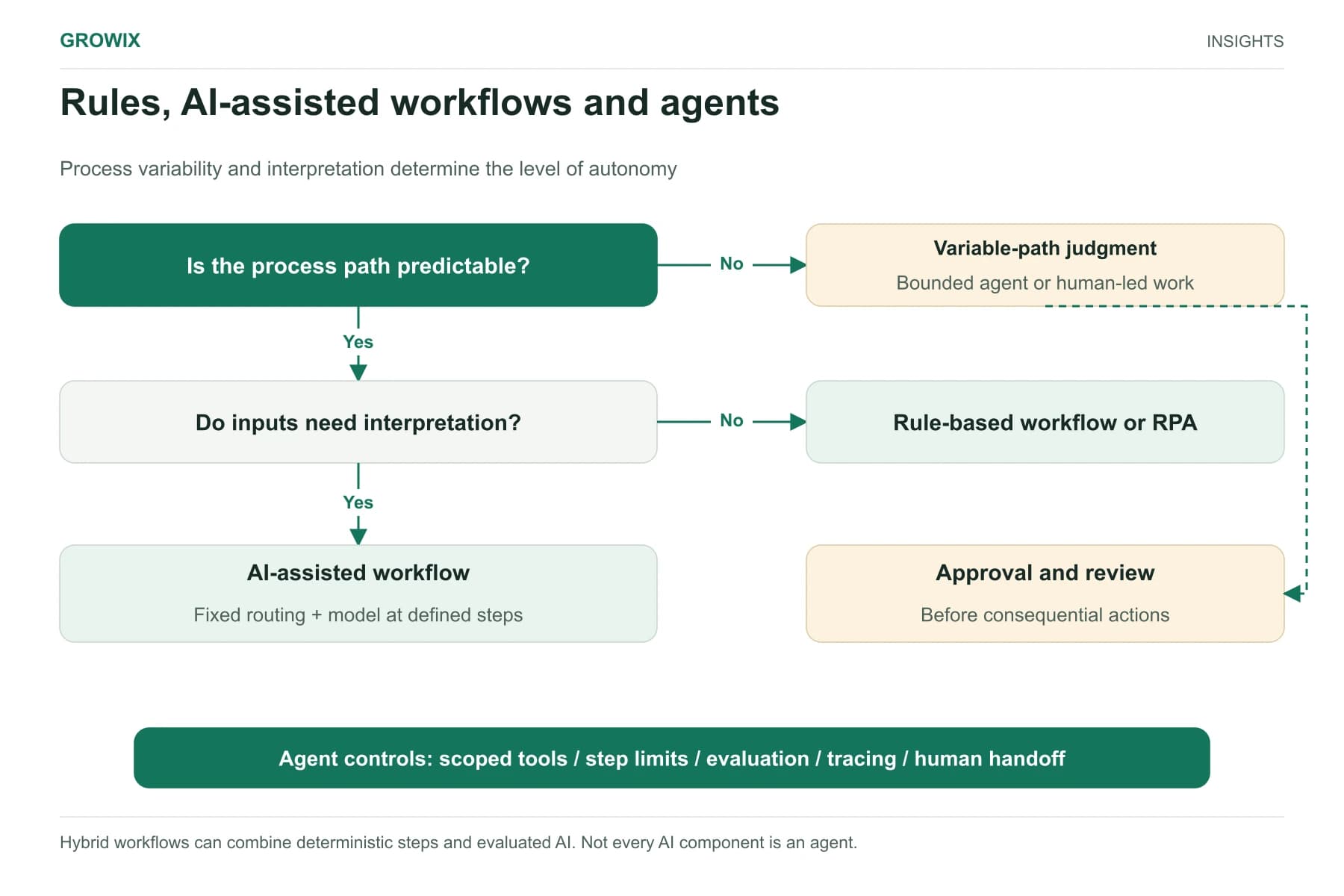
Plan for multi-step or agent behavior separately. If the feature will take actions in your product, rather than only generating text, narrow its permissions and log every action. The OWASP Gen AI Security Project's guidance on excessive agency is a useful checklist.
An AI feature inside a SaaS product. Vendor-neutral example. Retrieval must respect tenant access; not every AI feature needs retrieval. View full size
Stage 4: Test quality, latency and fallback
Conventional tests check that code does what it should every time. AI features produce variable output, so you also need evaluation: measuring how often the output is good enough, on representative inputs, every time something changes.
Build an evaluation set
Collect 100 to 300 real or realistic inputs that reflect your users, including awkward cases: empty projects, very long threads, mixed languages, contradictory data and adversarial text. For each, define what a good output contains, using a short rubric such as accuracy, completeness, citation of sources and appropriate tone.
Score in layers
Check type
What it catches
How it runs
Deterministic checks
Broken formats, missing links, length limits, leaked data from another tenant
Automated, on every change
Model-graded scoring
Accuracy and relevance at scale against the rubric
Automated, calibrated against human ratings
Human review
Subtle errors, tone and usefulness
Sample of outputs before each release and weekly in production
Adversarial tests
Prompt injection through user-supplied content, attempts to extract other data
Before launch and when prompts or tools change
Prompt injection deserves specific attention in SaaS products, because user-supplied content, such as a comment or an uploaded file, becomes part of the prompt. The OWASP entry on prompt injection describes how such content can redirect a model.
Set latency budgets and fallback behavior
Agree target response times, such as the time to first visible text for streaming features, and measure them at the 95th percentile, not only on average. Then decide what happens when the model is slow or unavailable: a timeout with a clear message, a fallback to a smaller model or the non-AI version of the screen. Test those paths deliberately.
Make evaluation part of release
Run the evaluation set whenever you change a prompt, model, retrieval setting or provider, and block releases that reduce scores beyond an agreed tolerance. Model providers update and retire models, so this is also how you check that a forced migration has not degraded quality. Growix's Software Testing & Quality Assurance team can build these automated checks into your delivery pipeline.
A hypothetical example
The following scenario is invented to illustrate the method.
A project management SaaS company wants an AI weekly summary. In stage 1 it writes the feature definition above. In stage 2 it discovers that comments are indexed without tenant identifiers in an older search cluster, so it fixes indexing first and adds a cross-tenant retrieval test to the build. In stage 3 it routes calls through a gateway, runs summaries as background jobs on Sunday night with a manual "refresh" option, and records cost per summary by plan. In stage 4 it builds an evaluation set of 200 real (anonymized) project histories, finds the first prompt invents due dates for undated tasks, and adds a deterministic check that every date in a summary must exist in the source data.
The team launches to 5% of accounts behind a flag and reviews a weekly sample before widening access.
Monitor quality in production
Pre-launch evaluation tells you the feature works on the cases you thought of. Production monitoring tells you what customers actually do with it.
Trace every request with the prompt version, model, retrieved sources, latency, token use and outcome, stored with retention limits that match your privacy commitments.
Capture lightweight feedback in the interface, such as a rating, a "report a problem" link or whether the user edited the output before using it.
Sample and review weekly, prioritizing low-rated outputs, long conversations and requests from new customer segments.
Watch for drift after model updates, prompt changes or large data imports, and re-run the evaluation set when you see unusual shifts.
Alert on spikes in errors, fallback rate, latency and cost per tenant.
Decide how to package and price the feature
AI features carry a variable cost per use that most SaaS features do not. Settle the commercial model before general release:
Approach
Works when
Watch out for
Included in all plans
Usage per account is modest and predictable
Heavy users eroding margin
Included with fair-use limits
Most accounts use it lightly; a few may not
Communicating limits clearly
Premium tier or add-on
The feature delivers distinct, measurable value
Lower adoption reducing feedback
Usage-based credits
Usage varies widely between customers
Billing complexity and customer anxiety about cost
Whichever you choose, the per-tenant cost tracking from stage 3 is what makes the decision reversible.
Pitfalls that delay AI features
Starting with the model instead of the task, which produces impressive demos nobody uses weekly.
Skipping the data audit, then discovering late that permissions or tenant identifiers are inconsistent.
No evaluation set, so every prompt change is judged by whoever happens to try it.
Treating the provider as always available, with no timeout, fallback or status messaging.
Leaving support out, so the first customer complaints reach a team that does not know how the feature works.
Launch measures
Track whether the feature creates value, not just whether it runs:
Adoption: share of eligible users who try the feature, and share who use it again within a month.
Task success: evaluation scores and in-product feedback such as thumbs up or edits before sharing.
Quality incidents: wrong or harmful outputs reported, with time to fix.
Latency and availability: 95th-percentile response time and fallback rate.
Cost per successful use by plan.
Business effect: retention, expansion or support contacts for accounts using the feature, compared with similar accounts that do not.
Responsibilities
Product: task choice, success criteria and pricing or plan limits.
Engineering: gateway, retrieval, tenant isolation and monitoring.
QA: evaluation set, automated checks and release gates.
Security and legal: data processing terms, sub-processor disclosure and adversarial testing.
Support: feedback triage and customer-facing documentation.
Frequently asked questions
What is AI integration?
AI integration means building AI capabilities, such as summarizing, drafting, classifying or answering questions, into an existing product or workflow so they use your data, permissions and interface. In SaaS, it also means attributing cost per tenant and testing quality before and after each release.
How do you integrate AI into an existing SaaS product?
Choose a frequent, checkable user task, prepare the data it needs with tenant and user permissions enforced on every retrieval, route model calls through a thin internal gateway, ship behind feature flags and run an evaluation set whenever prompts, models or retrieval settings change.
How do you keep customer data separate in SaaS AI features?
Store the tenant identifier on every indexed record or chunk and enforce it in every query, use separate indexes or namespaces where volume allows, apply the requesting user's permissions to retrieval, and test cross-tenant leakage explicitly in your evaluation set.
Next step
Write the one-page definition for your best candidate task, then audit whether your data layer can enforce tenant and user permissions for retrieval. Those two documents tell you how big the build really is.