Accounting practices, law firms, consultancies and agencies sell expertise by the hour, the project or the outcome. Generative AI touches almost every task that expertise relies on: research, drafting, analysis, summarizing and reviewing. That makes AI upskilling for professional services teams both more valuable and more delicate than in many other industries. Done well, it raises quality and frees senior time. Done carelessly, it exposes client data, produces confident errors and weakens how junior staff learn.
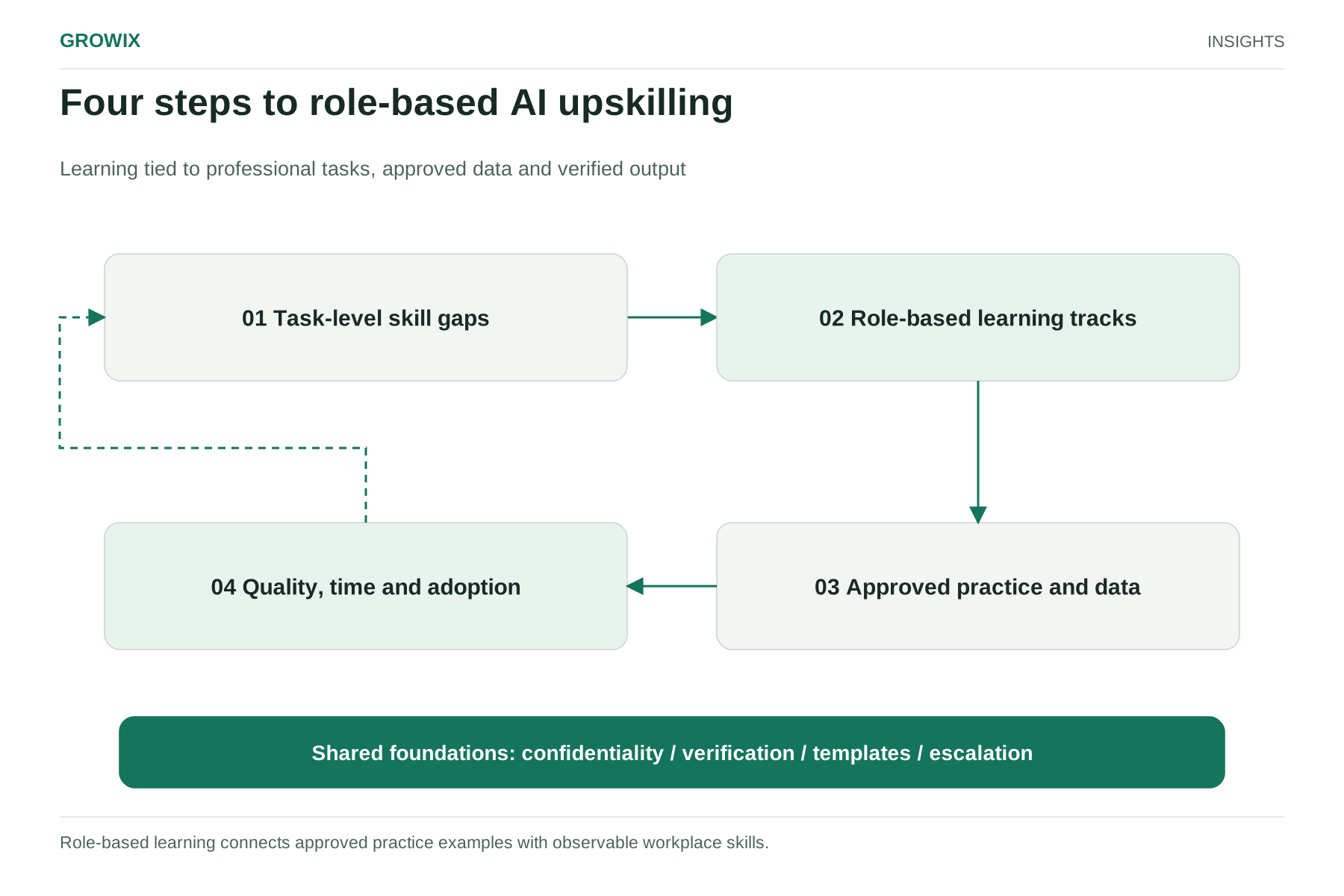
Most firms have already run an introductory session or two. Fewer have a plan that changes how client work is actually done. This guide sets out a practical approach: inventory skills at the task level, create role-based learning tracks, practice with permitted tools and data, and measure quality, time and adoption.
Why generic AI training falls short
Adoption is widespread, but value depends on changing work, not just access. McKinsey's State of AI 2026 survey of 1,719 respondents in 97 countries, fielded in May and June 2026, found that nearly nine in ten organizations use AI regularly in at least one function and 80% of respondents say AI has improved their individual productivity. Yet only 37% attributed any EBIT impact to AI. Among the small group of high performers, nearly three-quarters reported fundamentally redesigning workflows around AI, compared with about a quarter of other respondents.
Training that teaches people how to write prompts, without changing the workflows they use and the standards they are held to, tends to produce scattered individual gains and uneven quality. The plan below ties learning to specific tasks and quality controls.
Professional obligations also shape the plan. In law, the American Bar Association's Formal Opinion 512, issued July 29, 2024, says lawyers using generative AI must consider their duties of competence, confidentiality (including client informed consent where relevant), communication with clients and charging reasonable fees. Accounting, consulting and other regulated professions have comparable expectations through their own standards and client contracts. Training must cover these, not just the tools.
Step 1: Inventory task-level skill gaps
Start with the work, not the technology. For each role, list the ten to fifteen tasks that take the most time, then assess each one:
| Task (example: tax senior) | Frequency | AI suitability | Risk if wrong | Current skill |
|---|
| Summarizing client documents | Weekly | High | Medium | Low |
| Researching technical questions | Weekly | Medium; sources must be verified | High | Medium |
| Drafting client emails explaining positions | Daily | High | Medium | Medium |
| Reviewing workpapers | Weekly | Low to medium; supporting checks only | High | High |
| Preparing engagement letters | Monthly | Medium; templates first | High | Medium |
Tasks that are frequent, well suited to AI and lower risk are where training pays off first. High-risk tasks need stronger review standards before AI is used, even if the tool performs well in demonstrations.
Gather this information through short interviews and a survey, then validate it with practice leaders. The output is a skills map by role, not a generic "AI readiness" score.
Step 2: Set role-based learning tracks
Different roles need different skills. Four tracks cover most firms:
Leaders and partners. Focus on judgment: where AI changes the economics of engagements, pricing and fee implications, risk and client communication, and how review responsibilities change. Short, discussion-based sessions work better than tool demonstrations.
Client-facing professionals. Focus on the tasks from the inventory: drafting, summarizing, research with source verification, and analysis. Include explicit standards for checking output and for what must never be entered into a tool.
Junior staff and trainees. Focus on using AI without skipping the learning that builds expertise. Juniors traditionally learn by doing first drafts and routine analysis, which are exactly the tasks AI now accelerates. Pair AI use with explanation: juniors should be able to explain and defend every output they submit, and reviewers should ask them to.
Operations and administrative staff. Focus on workflow tasks such as scheduling, document handling and internal reporting, and on recognizing when a task belongs in a properly designed automation rather than ad hoc prompting.
Within each track, define proficiency levels so progress can be assessed:
- Aware: understands approved tools, policies and limitations.
- User: applies AI to defined tasks with correct verification.
- Practitioner: adapts templates, shares methods and spots risks for colleagues.
- Designer: helps redesign workflows and review standards with practice leaders.
A core curriculum that every track shares keeps the basics consistent:
| Module | What people should be able to do afterwards |
|---|
| How the approved tools work | Explain in plain terms why outputs can be fluent but wrong |
| Data and confidentiality rules | Classify a document and decide whether it may be used |
| Verification | Check facts, citations and calculations against sources |
| Task templates | Use the firm's templates for its most common tasks |
| Escalation | Recognize when to stop and ask a reviewer or risk lead |
Not everyone needs to reach level 4. A small network of practitioners and designers, one or two per team, is usually enough to spread good practice.
People learn by doing, but practice cannot put client confidentiality at risk.
- Approve specific tools with contractual terms covering data retention, training use, security and location of processing. Publish the list.
- Classify data simply, for example public, internal, client confidential and highly sensitive, with clear rules for which tools may be used with each class.
- Create a practice sandbox with anonymized or synthetic examples drawn from real task types, so people can practice without client data.
- Provide templates and examples for the high-value tasks from the inventory, reviewed by subject experts.
- Set verification standards: for example, every legal or technical citation produced with AI is checked against the original source before use.
- Clarify client communication: decide when and how the firm tells clients about AI use, and whether engagement terms need updating.
Hypothetical example: a 40-person accounting and advisory firm
This example is invented for illustration.
The firm's inventory shows that seniors spend many hours summarizing client documents and drafting explanatory emails, while managers spend time reworking juniors' first drafts. It runs a six-week program:
- Week 1: policy, approved tools and data rules for everyone, in a one-hour session plus a short quiz.
- Weeks 2 to 4: two 90-minute practical workshops per track using anonymized client scenarios, with templates for summaries and emails.
- Weeks 3 to 6: weekly "office hours" run by four internal practitioners, and a shared library of approved prompts and examples.
- Week 6: managers review a sample of AI-assisted work against the firm's normal quality checklist.
The firm deliberately excludes workpaper review and technical tax positions from the first phase, revisiting them only once verification standards are agreed.
Write a policy people can actually follow
Training works better when it teaches a short, concrete policy rather than a long document nobody reads. A one-page policy for a professional services firm usually covers:
- Approved tools and how to request a new one.
- Data rules by classification, with examples of what never goes into a tool.
- Verification duties: who checks what before AI-assisted work reaches a client.
- Disclosure: when clients are told about AI use, and how engagement letters address it.
- Billing: how time and fees reflect AI-assisted work, consistent with professional rules and client agreements.
- Reporting problems: how to report an error, data exposure or near miss without fear of blame.
Review it every six months; tools and client expectations change quickly.
Budget the program realistically
The largest cost is usually people's time, not the training itself. For a mid-sized firm, the budget should cover tool licenses for the approved set, design of role-specific materials, workshop and practice time for each participant, time for internal practitioners to coach colleagues, and review time for practice leaders to update quality standards. Protect that time explicitly, especially during busy seasons; programs that rely on spare time rarely reach the people who would benefit most.
Step 4: Measure quality, time saved and adoption
Measure outcomes the firm actually cares about, and do not rely on self-reported time savings alone.
- Quality: review findings and rework rates on AI-assisted work compared with a baseline, plus any client-reported errors.
- Time: sampled time studies on selected tasks before and after training, rather than general estimates.
- Adoption: active use of approved tools by role, and use of shared templates.
- Risk: policy breaches, data incidents and near misses, reported without blame so problems surface.
- Capability: progression through proficiency levels by role.
- Client and commercial effects: turnaround times, write-offs and how pricing reflects changed effort.
Review results with practice leaders after the first cycle, then expand to the next set of tasks from the inventory.
Responsibilities
- Firm leadership: priorities, policy approval and pricing decisions.
- Practice leaders: task inventories, quality standards and review.
- Learning and development: program design, scheduling and proficiency tracking.
- IT and security: tool approval, configuration, access and data controls.
- Risk or general counsel: professional obligations, client terms and incident handling.
- Internal practitioners: coaching, templates and feedback.
Common mistakes
- Training before choosing tools and policies, which teaches habits that later have to be undone.
- One session for everyone, which bores experts and overwhelms beginners.
- Measuring logins instead of quality, which rewards activity rather than better work.
- Ignoring juniors' development, which saves time today and weakens the firm's future expertise.
Frequently asked questions
What is AI upskilling?
AI upskilling is training employees to use AI tools well in their actual work: choosing suitable tasks, protecting confidential data, checking outputs and changing workflows so quality and productivity improve. It goes beyond introductory prompt-writing sessions.
How do you build an AI training program for employees?
Start with a task-level inventory of where time goes in each role, approve specific tools and a short data policy, set role-based tracks with defined proficiency levels, let people practice on permitted data and measure quality, time saved and adoption against a baseline.
How do you measure whether AI training works?
Measure outcomes the firm cares about: review findings and rework on AI-assisted work, time saved on specific tasks verified by sampling, adoption of approved tools and client feedback. Self-reported time savings alone tend to overstate the benefit.
Next steps
Pick two roles and run the task inventory with five people in each. It usually takes a week and shows exactly where training will matter. If the inventory reveals that whole workflows need redesigning, not just individual skills, our guide to AI transformation for professional services firms covers that broader change.
Growix's Learning & Development team designs and coordinates role-based training and upskilling measured by outcomes, and our HR Technology & Automation team supports the systems and reporting that track progress.
Discuss your hiring and people operations needs