In accounting practices, law firms, consultancies and agencies, a new client usually passes through four or five systems before the first invoice goes out: a CRM, an e-signature tool, a practice or project management system, a document store and an accounting or billing platform. Each system may work well on its own. The delays, errors and duplicated typing happen in the gaps between them.
Client onboarding automation closes those gaps. Done well, a signed engagement creates the client record, the project or matter, the folders and the billing setup without anyone retyping a name or rate. This guide shows how to map those handoffs, choose a sensible first workflow, deal with exceptions and access, and measure whether the work paid off.
A note on terms
"Professional services automation" often refers to a specific software category, known as PSA tools, that combines project management, resource planning, time tracking and billing in one product. A PSA platform can remove some handoffs by putting several steps in one system. Many firms, however, already have tools they want to keep. This guide focuses on connecting the systems you have; the same mapping exercise also helps you judge whether a single PSA platform would be simpler.
Map the five handoffs from signed client to paid invoice
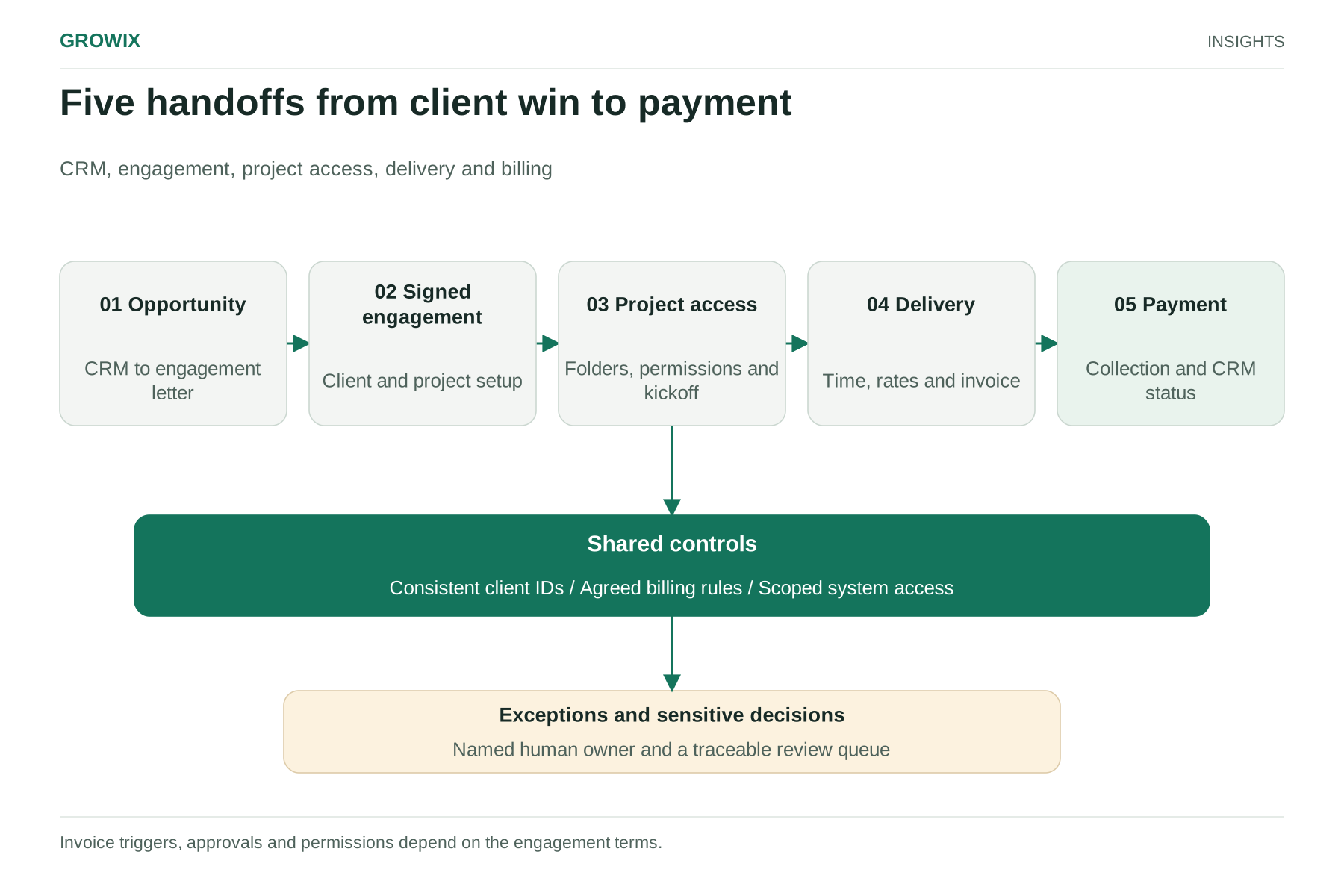
Start with a whiteboard or a spreadsheet, not a tool. Trace one real recent client from "won" to "paid" and write down every point where information moves from one person or system to another. In most firms, the journey breaks into five handoffs.
| Handoff | Typical systems | Common failure |
|---|
| 1. Won opportunity to engagement letter | CRM, document templates, e-signature | Fees or scope typed into the letter differ from the CRM record |
| 2. Signed letter to client and project setup | E-signature, practice or project management tool, accounting platform | Client created twice, under slightly different names |
| 3. Project setup to team access and kickoff | Identity provider, document store, client portal, calendar | Folders and permissions created late, or too broadly |
| 4. Delivery to invoice | Time tracking, project tool, billing | Wrong rates, missed billable items, invoices delayed until month end |
| 5. Invoice to payment and status update | Billing, payment processor, CRM | Account managers unaware of overdue invoices; CRM never updated |
For each handoff, note who does it today, how long it takes, how often it goes wrong and what an error costs: a rework hour, a credit note, an annoyed client or a compliance risk.
Some firms have a step that must stay human by design, such as a conflict check in a law firm or identity verification under anti-money-laundering rules in an accounting practice. Automation can gather the inputs and route the task, but the decision should remain with an accountable person.
Choose a first workflow
Trying to automate the whole journey at once is the most common reason these projects stall. Score each handoff on four factors, from 1 (low) to 5 (high):
- Volume: how often it happens each month.
- Error cost: what a mistake costs in time, money or client trust.
- Rule clarity: whether the steps follow clear rules, or rely on judgment.
- Integration readiness: whether the systems involved have usable APIs or native connectors.
Multiply the four scores. The highest total is usually your best first candidate. A handoff that scores 5 on volume but 1 on rule clarity is a process problem to fix before automation, not after.
The AICPA's guidance on building automations in a small firm makes the same point from the other direction: automations work best with well-defined processes, so firms without clear documentation should map the workflow first, then pick one routine task and expand from there.
Hypothetical example: a 25-person consultancy
The following example is invented for illustration.
The firm wins about 15 new engagements a month. When an engagement letter is signed, an operations coordinator re-enters the client's details into the project tool, the accounting platform and the document store, and creates a shared folder with the right permissions. Each engagement takes about 40 minutes of setup, and roughly one in ten has an error, usually a misspelled client name or a missing billing contact, that delays the first invoice.
Scored against the four factors, handoff 2 (signed letter to client and project setup) comes out highest: frequent, clearly rule-based, and supported by connectors in all three systems. The firm automates it first:
- The e-signature tool marks the envelope complete.
- An integration reads the signed fields and the matching CRM opportunity.
- It checks the accounting platform for an existing client by tax ID or domain before creating a new one.
- It creates the project with the agreed rate card, the folder from a template, and a kickoff task assigned to the engagement lead.
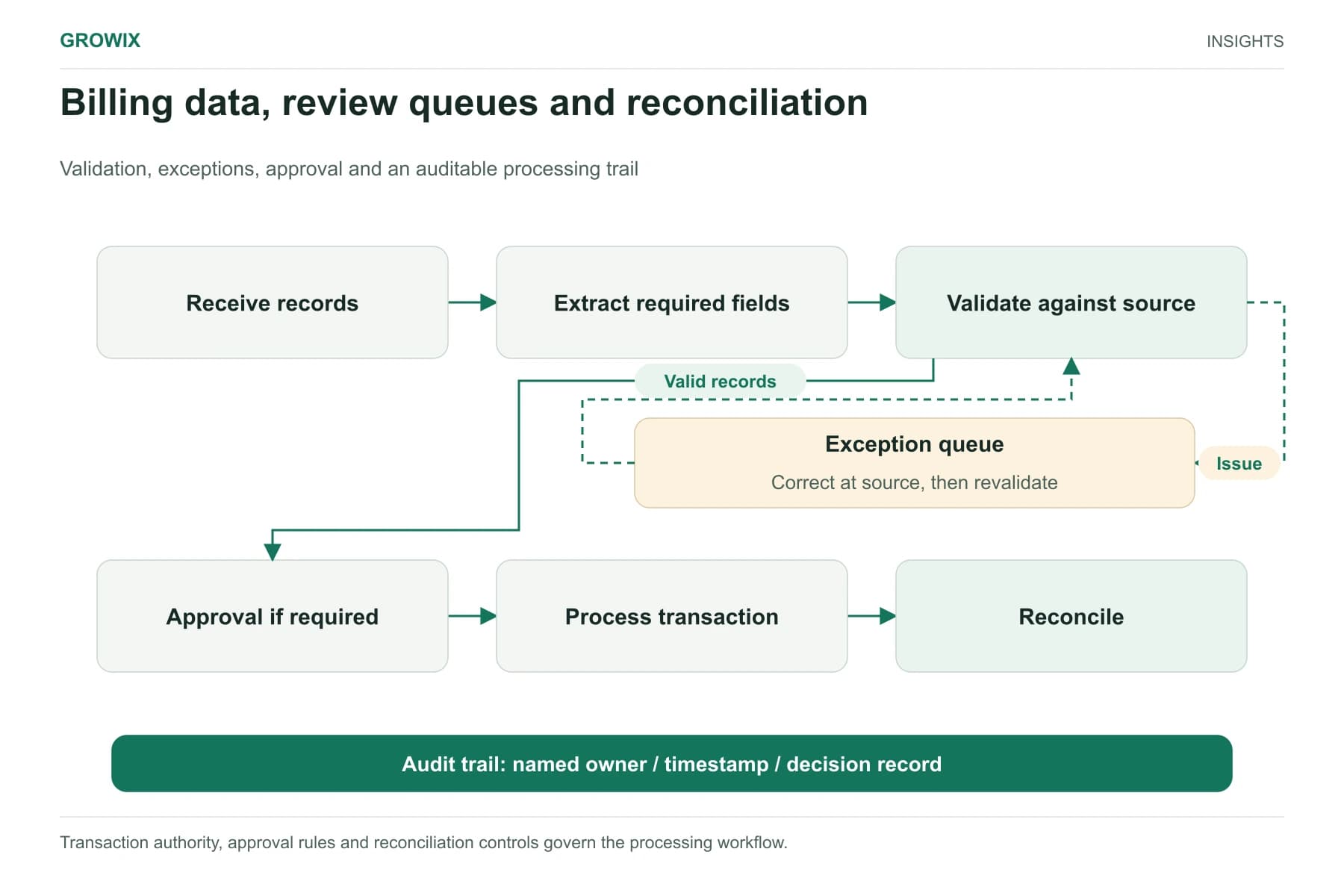
- Anything that fails a check, such as a missing billing email, goes to an exception queue instead of proceeding.
At 15 engagements a month and 40 minutes each, the manual work being replaced is about 10 hours a month. The bigger benefit is often consistency: every project starts with the same structure and correct billing data.
Connect systems in a way you can maintain
There are three broad ways to connect the tools:
- Native integrations between two products are quickest to set up but limited to what the vendors support.
- Integration platforms (often called iPaaS), such as Zapier, Make or Microsoft Power Automate, connect many cloud applications without code and suit simple, linear workflows.
- Custom integrations through APIs or middleware give the most control over validation, retries and logging, and suit multi-step workflows with business rules.
Whichever route you choose, insist on four things: a single source of truth for each data field (the client's legal name should live in one place), unique identifiers that link the same client across systems, logs that show what each run did, and a named owner for every automation.
Handle exceptions and access deliberately
Automations do what they are told, including the wrong thing at speed. Design for the cases that do not fit.
Exception queues. Route records that fail validation to a visible queue with a clear reason, rather than letting them fail silently or create partial data. Someone should check the queue daily.
Duplicate detection. Match on stable identifiers before creating new records. Names alone are not reliable.
Manual override. Some clients will need non-standard billing terms or multi-entity setups. Allow a human to take over a single case without breaking the workflow for everyone else.
Least-privilege access. Integration accounts should have only the permissions they need, preferably tied to a service identity rather than a former employee's login. Shared folders and client portal access should be granted per engagement and removed at the end. Review integration credentials when staff leave.
Client data obligations. Professional services firms often hold sensitive financial, legal or personal data. Check that each connected tool's data handling meets your contractual and regulatory obligations before you send data through it.
Assign responsibilities before you build
Onboarding crosses departments, so each automation needs owners on both the business and technical side. A simple responsibility split for a mid-sized firm:
| Role | Responsible for |
|---|
| Operations or practice manager | The process definition, exception queue and day-to-day performance |
| Finance lead | Billing rules, rate cards, payment terms and invoice accuracy |
| Partner or engagement lead | Approving non-standard terms and client-specific exceptions |
| IT or systems owner | Integration accounts, permissions, logging and changes to connected tools |
| Compliance or risk lead (where relevant) | Conflict, identity and data-handling steps that must stay human |
Dependencies deserve the same attention. Note which vendor controls each connector, what happens when a system changes its fields or API version, and who is told when an integration fails. A short runbook per automation, covering what it does, how to pause it and how to replay failed records, saves hours the first time something breaks.
Build connections or adopt a PSA platform?
If the mapping exercise shows that most handoffs sit between project, time and billing tools, consolidating them in a single PSA platform may remove more friction than connecting separate tools. If your firm is attached to a particular CRM or accounting platform, or your workflows are unusual, connecting existing systems is usually less disruptive. Either way, the handoff map you have just built becomes the requirements list.
Measure cycle time and error rates
Capture a baseline for four or six weeks before switching anything on, then compare the same measures afterwards:
- Signed-to-kickoff time: days between a signed engagement letter and a ready project with access granted.
- Signed-to-first-invoice time: a direct measure of cash-flow delay.
- Setup error rate: the share of new clients needing a correction to name, rate, billing contact or permissions.
- Invoice adjustments: credit notes and re-issued invoices caused by setup errors.
- Manual touches per engagement: how many times someone has to type the same information.
- Days sales outstanding: a lagging indicator influenced by many factors, but worth watching alongside the others.
If cycle time improves but the exception queue grows each week, the rules need refining. If nobody checks the exception queue, the automation is creating hidden work.
Frequently asked questions
How do you automate the client onboarding process?
Trace one recent client from signed engagement to paid invoice and list every handoff between people and systems. Score each handoff on volume, error cost, rule clarity and integration readiness, automate the highest-scoring one first, route failures to a visible exception queue, and compare cycle time and error rates against a baseline.
Is client onboarding automation the same as a PSA tool?
No. A professional services automation (PSA) tool combines project management, resource planning, time tracking and billing in one product, which removes some handoffs. Client onboarding automation connects the tools you already have, such as CRM, e-signature, project and accounting systems. The same handoff map helps you choose between the two.
Which onboarding steps should stay manual?
Steps that require accountable judgment, such as conflict checks in law firms or identity verification under anti-money-laundering rules, should stay with a person. Automation can gather the inputs and route the task. Non-standard billing terms and multi-entity setups also need a manual override.
After the first workflow
Once the first handoff runs reliably for a month or two, move to the next highest-scoring one. Invoice generation from approved time or milestones (handoff 4) is often the next candidate, because errors there directly delay payment. Firms that want to redesign the delivery work itself, rather than the administration around it, should read our guide to AI transformation for professional services firms. If the bottleneck is the volume of billing and data administration rather than the connections between systems, back-office automation and outsourcing for professional services covers that operating question.
Growix's Business Process Automation service identifies costly manual processes and automates them with documented, monitored workflows. Our Systems Integration team connects CRM, billing, document and project tools so data moves reliably between them.
Discuss your IT and infrastructure needs