Black Friday Website Checklist: Final-Month Infrastructure Readiness for E-commerce
Four weeks before Black Friday, the work is testing and ownership, not new features. A checklist for checkout testing, dependencies, alerting and incident response.
In 2026, Thanksgiving falls on November 26, Black Friday on November 27 and Cyber Monday on November 30. With roughly a month to go, the most valuable infrastructure work is no longer building capacity from scratch. It is proving that the checkout works under realistic load, knowing which outside services can break it, and making sure a named person responds when something does.
Use the checklist below in order. Each section ends with the question that tells you whether it is done.
A timeline for the final month
Window (2026)
Focus
Now to November 6
Dependency map, load and spike tests, quota increases
November 9 to 13
Fix what testing found; retest; agree alert owners and rota
November 16 to 20
Change freeze begins; runbook walk-throughs; rollback test
November 23 to December 1
Peak operations: monitoring, daily check-ins, approved changes only
December 2 to 4
Post-event review while details are fresh
Adjust the dates to your own release calendar. The principle is to finish testing early enough to fix what it finds, and to freeze changes before traffic builds rather than on the day.
1. Test the full checkout path, not just the homepage
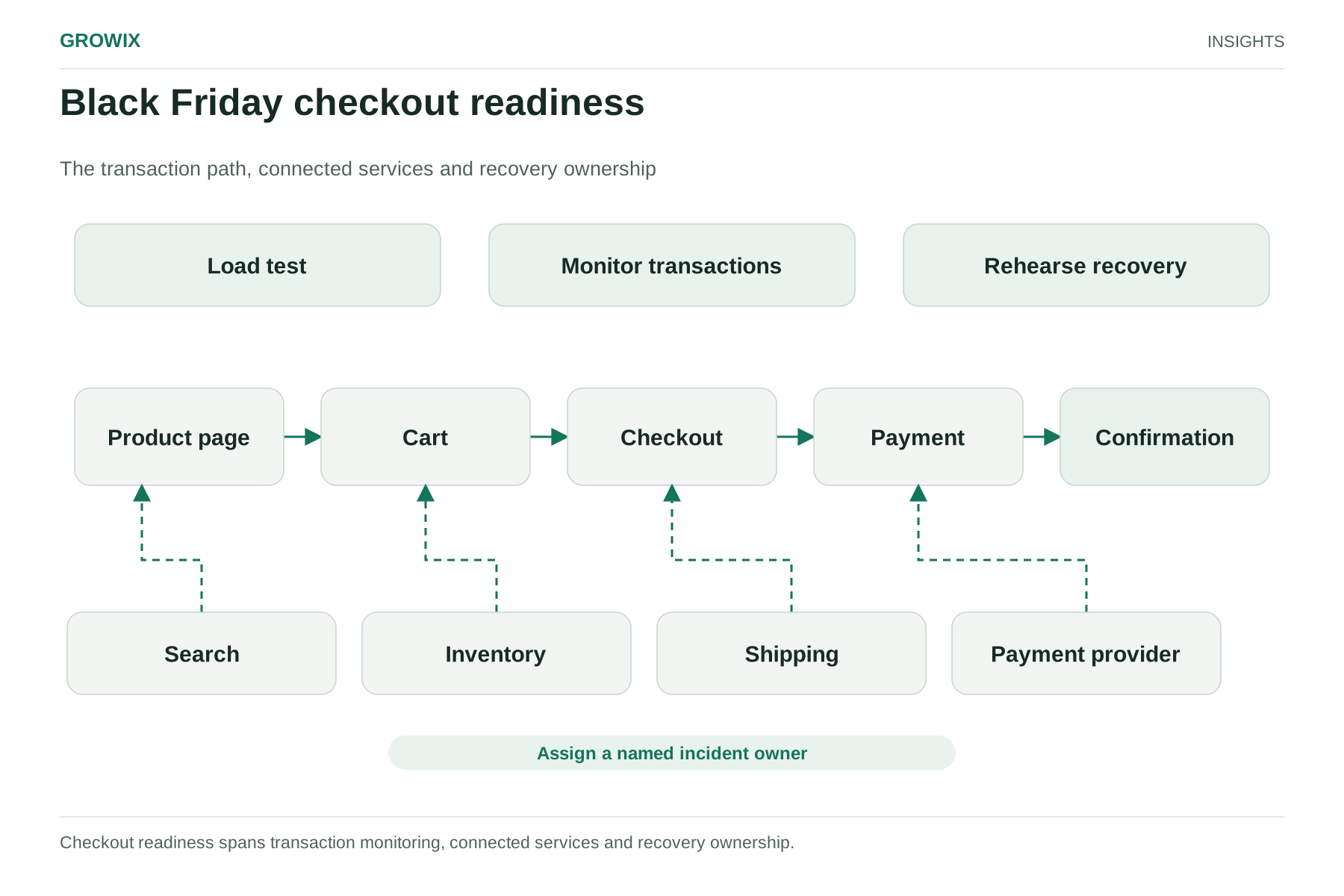
A fast homepage tells you little about Black Friday website performance. Revenue depends on a chain: product page, search, cart, shipping calculation, tax, payment authorization, order confirmation and the email that follows.
Script the three to five journeys that generate most revenue, including guest checkout and a discount-code path.
Run load tests against the whole journey with headroom above your expected peak, plus a short spike test that ramps traffic quickly.
Use test payment modes or sandbox credentials agreed with your payment provider, and warn third parties before you send test traffic to them.
Record baseline page times and error rates now, so you can recognize degradation on the day.
Retest after any change made late in the season.
Traffic does not arrive only on Friday. LogicMonitor's peak-season readiness guidance, published October 16, 2026, cites Fastly analysis showing traffic rising before Black Friday and staying elevated through the month, which is why tests should cover sustained load, not just a one-hour peak.
Done when: you know the order rate at which checkout times or error rates start to degrade, and it is comfortably above your forecast.
2. Review capacity and external dependencies
Most checkouts depend on services you do not run. List every one a purchase touches: DNS, CDN, web application firewall, hosting or platform provider, search, payments, fraud screening, tax, shipping rates, inventory sync, analytics and tag manager scripts.
Dependency
Question to answer
Fallback if it fails
Payment gateway
Is a second method or provider available?
Hide the failing method; show a clear message
Shipping or tax API
What happens if it times out?
Flat-rate shipping or a cached rate table
Site search
Can browsing still work if search is slow?
Category navigation and popular-product links
Third-party scripts
Do any block page rendering?
Load asynchronously or disable through tag manager
CDN or DNS
Who can switch configuration, and how fast?
Documented change with an owner and approval
Outages at shared providers are a real risk. The same LogicMonitor article notes that a Cloudflare network failure began on November 18, 2025, ten days before last year's Black Friday, and affected retailers relying on its services.
Check capacity limits as well as servers: database connection limits, API rate limits with partners, autoscaling maximums, and account-level quotas on your cloud provider. Raise quotas now; requests can take time to approve.
Done when: every dependency on the checkout path has an owner, a known failure behavior and an agreed fallback.
Black Friday checkout readiness. Checkout readiness spans transaction monitoring, connected services and recovery ownership. View full size
3. Set alerts and name the owners
Alerts without owners create noise, not responses.
Monitor checkout from the customer's side with synthetic transactions that run every few minutes, alongside real-user monitoring.
Alert on order rate, payment failure rate and checkout response time against your baseline, not only on server CPU.
Assign a primary and backup owner for each alert across the full Thanksgiving-to-Cyber-Monday window, including nights.
Confirm escalation contacts at your hosting platform, payment provider and CDN, along with your support plan level.
Keep a way to check the site that does not rely on the same infrastructure, in case your monitoring provider is affected too.
Done when: a payment-failure spike at 2 a.m. on Saturday would reach a named person within minutes.
4. Prepare rollback and an incident runbook
Decide in advance what you will do, so nobody improvises under pressure.
Set a change freeze date for non-urgent code and configuration, and agree who can approve exceptions.
Confirm that rollback works for the current release and has been tested recently.
Write a one-page runbook for each likely failure: payment provider degraded, search down, inventory sync delayed, site slow under load, CDN problems.
Define who can turn off non-essential features, such as recommendations, live chat widgets or heavy personalization, to protect checkout.
Book a post-event review for the first week of December while details are fresh.
Done when: each person on the rota knows which runbook they own and has walked through it at least once.
How to judge whether you were ready
After the peak, compare actual results with your baseline: checkout success rate, payment authorization rate, page response time at the busiest hour, the number of incidents, and the time from alert to response. Note which dependencies caused problems and which fallbacks you used. Those notes become next year's checklist and often reveal architecture work worth scheduling for the quieter first quarter.
If campaigns are part of your peak plan, align send times with this checklist; a large email drop is effectively a scheduled traffic spike. Our Black Friday email and SMS checklist covers the marketing side.
Frequently asked questions
When is Black Friday 2026?
In 2026, Thanksgiving falls on Thursday, November 26, Black Friday on November 27 and Cyber Monday on November 30. Traffic typically builds before Black Friday and stays elevated through the weekend, so plan monitoring and on-call cover for the whole window, not just one day.
How do you load test an e-commerce site for Black Friday?
Script the three to five journeys that produce most revenue, including guest checkout and a discount code, and test the full path from product page to order confirmation. Run sustained load above your forecast peak plus a short spike test, use your payment provider's test mode, and warn third parties before sending test traffic to them.
What should a Black Friday incident runbook include?
One page per likely failure, such as a degraded payment provider, slow search, delayed inventory sync or CDN problems. Each page should name the owner, the first checks to run, the fallback, who can switch off non-essential features and how to communicate with customers and the wider team.
Getting help before the freeze
Growix's Infrastructure Reliability & Monitoring service sets up monitoring, alerting and incident troubleshooting, and our Cloud Infrastructure & Architecture team reviews scaling and capacity. With weeks rather than months remaining, the realistic scope is testing, alerting and runbooks, not re-architecture.