Back-office Automation for Professional Services Firms: Improving Billing and Data Quality
Late invoices and messy client data usually come from the back office, not the billing system. Combine automation with human review queues, clear ownership and quality measures.
In professional services firms, revenue depends on a surprising amount of administration. Time entries must be complete and coded correctly, matters and projects set up with the right rates, pre-bills reviewed, invoices issued and supplier invoices processed. Client and matter data must stay accurate across systems. When that work is rushed or inconsistent, the symptoms are familiar: invoices go out late, write-downs rise, clients query bills and month-end close drags on.
Software alone rarely fixes this. The most reliable approach combines automation for the repetitive steps with trained people working through structured review queues, whether those people are in-house or an outsourced back-office team. This guide shows how to define the scope, design review queues and exception handling, assign ownership and service levels, and measure rework, accuracy and cycle time.
Step 1: Define the billing and data processing scope
Start by listing the back-office processes that affect billing and data quality, and how each performs today.
Process
Typical tasks
Common quality problems
Time and expense capture
Reminders, completeness checks, coding to matters and tasks
Missing or late time; wrong codes; vague narratives
Matching payments, client accounts and bank records
Unapplied cash; unexplained differences
Client and matter data maintenance
Updating contacts, addresses, entities and statuses
Out-of-date records across systems
For each process, record volume, effort, current error rate and the cost of errors, such as delayed cash, write-offs or client complaints. That baseline guides prioritization and proves later improvement.
Prioritize processes where errors reach clients or delay cash. A missing purchase order number that causes a corporate client's accounts payable team to reject an invoice can delay payment by weeks, while an internal coding error may only affect reporting. Rank processes by the cost of their errors, not just by the hours they consume, and start with the one at the top of that list.
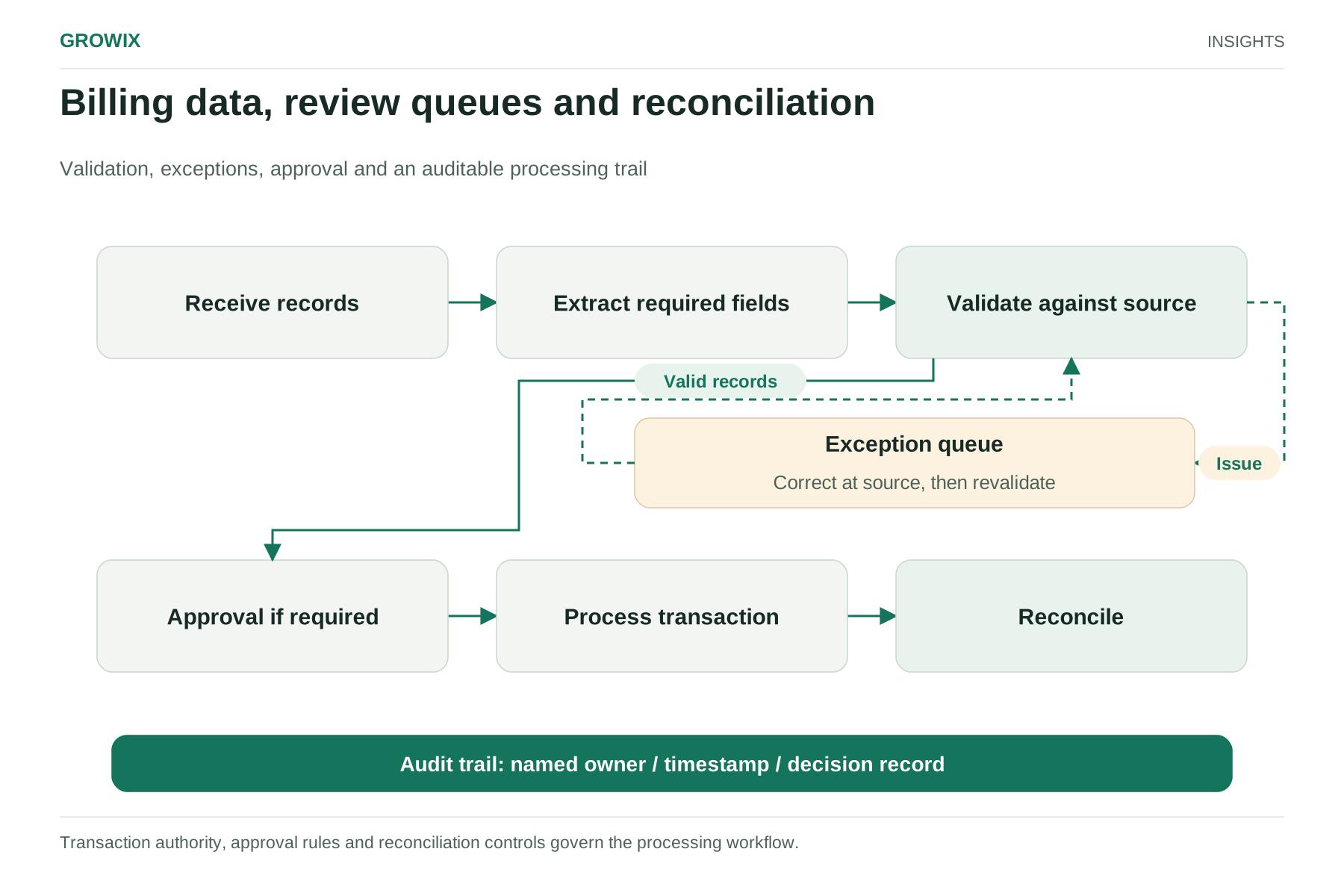
The core idea is simple: automation handles the predictable cases, and people handle the exceptions, through queues with clear rules.
Automate the predictable steps
Validation rules at the point of entry: required fields, valid matter codes, rate checks against the rate card.
Reminders and escalations for missing time entries or overdue pre-bill reviews.
Document capture that extracts supplier invoice details for matching against purchase orders or engagement budgets.
Billing rule application for common arrangements such as fixed fees, caps and discounts.
Duplicate detection for supplier invoices and client records.
Route everything else to review queues
Each exception should land in a queue with a reason code, an owner and a target time. For example:
Queue
Example exceptions
Who resolves
Time entry exceptions
Entries on closed matters; narratives missing for client-required detail
Back-office team, with fee earner clarification
Rate and billing rule exceptions
Rates differing from the engagement letter; caps exceeded
Billing specialist, approved by engagement lead
Supplier invoice exceptions
No matching purchase order; amount differs from approval
Accounts payable team, approved by budget holder
Data quality exceptions
Possible duplicate client; missing tax or contact data
Data processing team, confirmed with client service
Review queues work only if they are visible and managed. Report queue size and age daily, and agree what happens when items exceed their target time.
Build quality control into the workflow
Use sampling to check work that passes automated rules: for example, reviewing a set percentage of processed invoices or updated records each week, with a higher rate for new team members or new processes. Track error types to improve rules and training, rather than just correcting individual mistakes.
Billing data, review queues and reconciliation. Transaction authority, approval rules and reconciliation controls govern the processing workflow. View full size
Step 3: Assign ownership and service levels
Back-office work crosses fee earners, finance and operations. Ambiguity about who decides causes most delays.
Finance leadership owns billing policies, approval limits and the accuracy of financial records.
Engagement or matter leads own time-entry accuracy and pre-bill approval for their clients.
The back-office team, in-house or outsourced, owns processing, queue management, data maintenance and quality control within agreed rules.
IT or systems owners own the automation rules, integrations and access.
If you outsource, the provider operates processes under your direction and policies. Decisions about what to bill a client, write-offs and supplier payments stay with your firm's accountable people.
Agree service levels in writing, for example:
Time to process standard items, such as supplier invoices or data updates, within an agreed number of business days.
Accuracy targets measured through sampling.
Maximum age for exception queue items before escalation.
Reporting frequency and content.
Set initial targets from your baseline rather than from generic benchmarks, then tighten them as the process stabilizes.
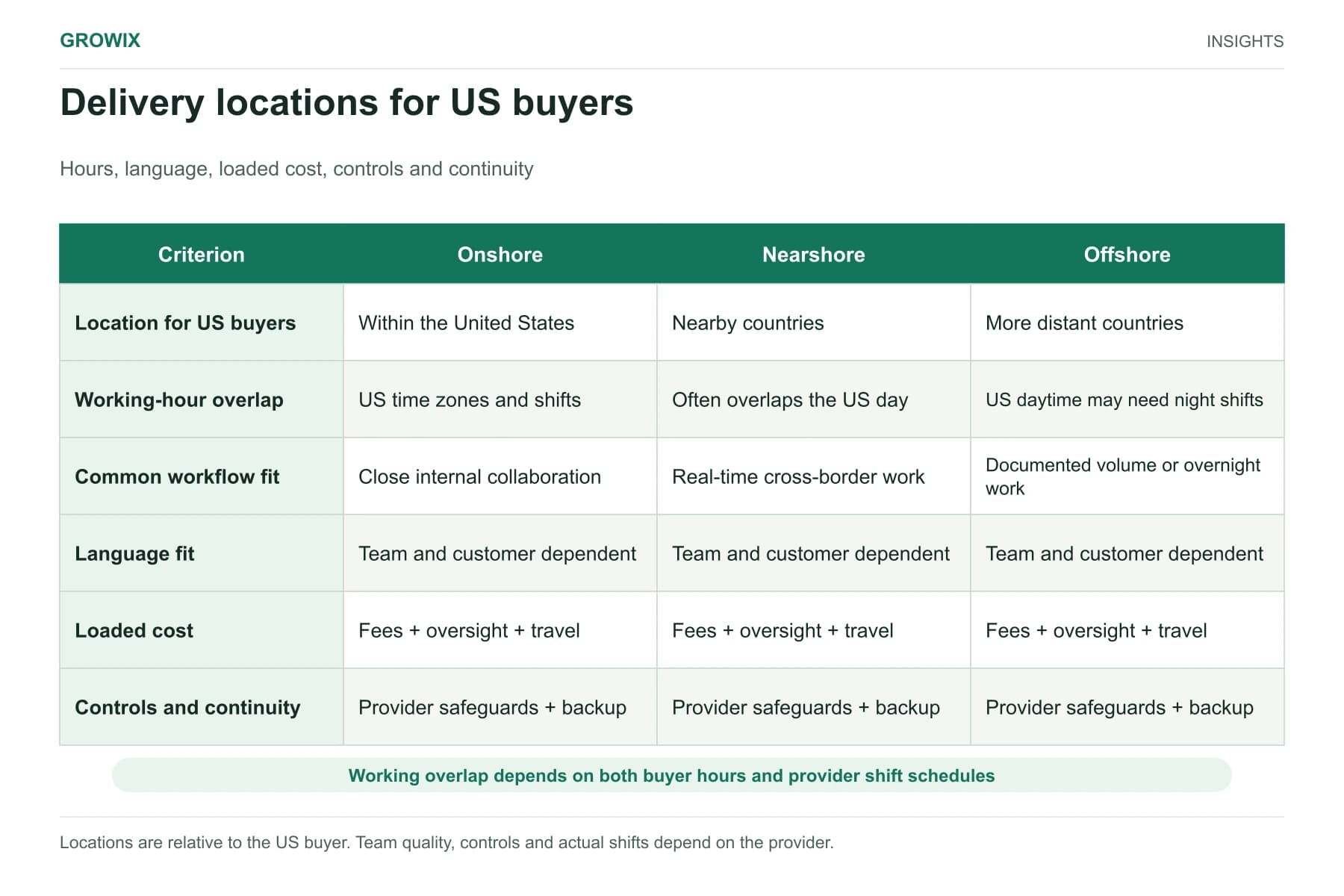
Should the back office be outsourced?
Outsourcing is increasingly about whole processes rather than individual tasks. Grant Thornton's 2026 analysis of outsourcing and AI, published by its outsourcing practice and drawing on its first-quarter 2026 CFO survey, reported that 66% of CFOs ranked benefits other than cost as the top benefit of outsourcing, and that standardized, repeatable processes are the easiest to transform with technology. That suggests a practical order: standardize the process and its rules first, then decide who should operate it.
Outsourcing tends to fit when volumes are steady or seasonal, processes can be documented, and in-house staff are spending scarce time on routine processing. It is less suitable for work that requires close daily judgment by senior people, or where client contracts restrict who may handle their data.
Hypothetical example: a 50-person consulting and accounting firm
The following example is invented to illustrate the method.
The firm bills monthly. Invoices typically leave eight to ten working days after month end because time entries are incomplete and pre-bills wait for partner review. About one invoice in seven is reissued after client queries about rates or missing purchase order numbers.
It redesigns the process:
Validation rules now block time entries to closed matters and flag missing narratives for clients who require them.
Automated reminders go to fee earners on the last two working days of the month, with escalation to practice leads.
A back-office team prepares pre-bills, applies billing rules and routes exceptions to a billing specialist queue.
Purchase order numbers and billing contacts are verified at matter setup by the data processing team.
Partners review pre-bills in a single system view, with a two-day target.
The firm will measure days from month end to invoice, the reissue rate and write-downs over the next six billing cycles against its baseline.
Step 4: Measure rework, accuracy and cycle time
Choose a small set of measures and report them monthly:
Measure
What it shows
Days from period end to invoices issued
Billing cycle time and cash-flow effect
Invoice reissue or credit note rate
Billing accuracy as clients experience it
Write-downs and write-offs
Revenue lost to errors, delays or disputes
Days sales outstanding
Cash collection, influenced by billing quality
Exception queue volume and age
Whether exceptions are managed or accumulating
Sample accuracy rate
Quality of processed work
Duplicate or incomplete records found
Data quality trend
Supplier invoices paid on time
Accounts payable performance
Look for root causes as well as totals. If most rate exceptions come from one practice area, the fix may be a better matter setup process for that team rather than more review.
Responsibilities and dependencies
Dependencies to manage include the practice management and accounting systems, document capture tools, client e-billing portals, data protection obligations and client-specific billing guidelines. Keep a register of client billing requirements, since rejected e-bills often come from client-specific rules nobody recorded centrally.
Moving work to a new back-office model
Whether you are centralizing work internally or moving it to an outsourced team, plan the transition in stages:
Document the current process with the people who do it, including the unofficial workarounds.
Clean the reference data first: rate cards, client billing guidelines, supplier records and matter codes. Automation built on poor reference data simply produces errors faster.
Run in parallel for at least one billing cycle, comparing outputs before switching over.
Move one process at a time, starting with the one with the clearest rules, such as supplier invoice processing, before pre-bill preparation.
Hold weekly reviews during the first months to resolve exceptions, refine rules and update documentation.
Tell fee earners what will change for them: new deadlines, who will contact them about missing information and how to raise problems. Their cooperation determines whether time capture improves.
Common mistakes
Automating exceptions away by loosening validation rules until fewer items are flagged, which hides problems rather than fixing them.
Leaving queues without owners, so exception items age quietly until month end.
Measuring processing speed only, while reissued invoices and write-downs rise.
Ignoring client-specific billing rules, which drive a large share of rejected and queried invoices in firms with corporate clients.
Frequently asked questions
What is back office automation?
Back office automation uses software rules and integrations to handle repetitive administrative steps, such as validating time entries, matching invoices, checking rates and updating records, while routing exceptions to people through review queues with owners and target times.
Which back-office processes should a professional services firm automate first?
Start with processes where errors reach clients or delay cash, usually time capture and pre-bill preparation. Measure volume, effort, error rate and the cost of errors for each process, then automate the predictable steps of the highest-impact one first.
Should back-office work be outsourced?
It tends to fit when volumes are steady or seasonal, processes can be documented and in-house staff spend time on work below their skill level. The provider operates processes under your direction; decisions about what to bill clients stay with the firm.
Next steps
Start with the process that most affects cash flow, usually pre-bill preparation or time capture. Measure its baseline for one or two billing cycles, design the queues and rules, then decide whether your team or an outsourced team should operate it.