Email Deliverability for E-commerce and B2B Senders: Meeting Gmail, Yahoo and Outlook Requirements
Email Deliverability for E-commerce and B2B Senders: Meeting Gmail, Yahoo and Outlook Requirements
An email that is delivered can still land in spam. Authentication, low complaint rates, easy unsubscribes and steady sending decide whether your emails reach the inbox.
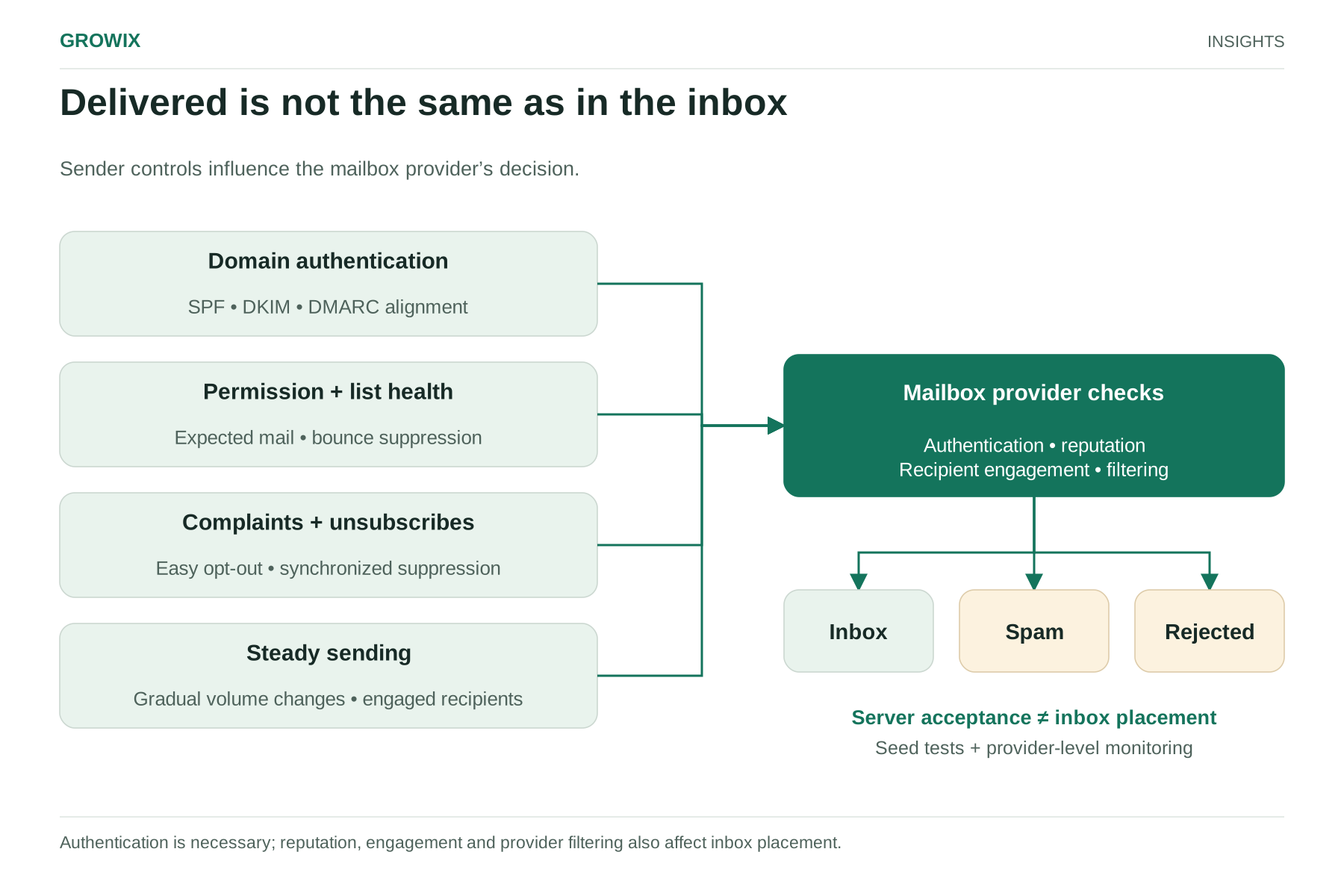
Email deliverability is whether your messages reach the inbox rather than the spam folder, or are rejected outright. It is different from the "delivered" figure in most email platforms, which only means the receiving server accepted the message. A campaign can show 99% delivered and still land largely in spam.
Deliverability matters more than it used to. Since 2024, the largest mailbox providers have published firm requirements for bulk senders, and they enforce them. For an online store, poor deliverability means promotions and order-related messages that customers never see. For a B2B company, it means nurture sequences and event invitations that quietly stop working. This guide explains the current requirements, the factors that decide inbox placement and a practical routine for testing and monitoring.
What the major mailbox providers now require
Gmail. Google's email sender guidelines set requirements for everyone sending to personal Gmail accounts from February 1, 2024, including SPF or DKIM authentication and keeping spam rates reported in Postmaster Tools below 0.3%. Senders of more than 5,000 messages a day to Gmail accounts must also publish DMARC for their sending domain (a policy of "none" is accepted), and marketing and subscribed messages must support one-click unsubscribe with a visible unsubscribe link in the body. Google recommends keeping the spam rate below 0.10% and never reaching 0.30%.
Yahoo introduced comparable requirements for bulk senders at the same time, covering authentication, one-click unsubscribe and low complaint rates.
Microsoft Outlook. For domains sending 5,000 or more messages a day to Outlook.com, Hotmail.com and Live.com addresses, Microsoft requires passing SPF and DKIM and a published DMARC policy of at least "none," aligned with SPF or DKIM. As summarized by the DMARC provider dmarcian, non-compliant bulk messages have been rejected since May 5, 2025, rather than filtered to junk.
Even if you send fewer than 5,000 messages a day, meet the bulk sender requirements anyway. Volumes grow, promotions spike, and the practices that satisfy the rules are the same practices that keep mail out of spam.
Step 1: Authenticate your sending domain
Authentication proves that mail claiming to come from your domain really does.
SPF lists the servers allowed to send mail for your domain. Include every service that sends on your behalf, such as your email platform, help desk, CRM and billing system, and stay within SPF's limit on DNS lookups.
DKIM adds a cryptographic signature to each message. Set up DKIM with your own domain in every sending platform, rather than relying on the platform's shared domain.
DMARC tells receiving servers what to do with mail that fails authentication and sends you reports. Start with a policy of "none" to collect reports, fix the legitimate senders the reports reveal, then move toward "quarantine" or "reject" to protect your domain from spoofing.
Alignment: the domain in the visible From address should match the domain authenticated by SPF or DKIM.
Many companies discover through DMARC reports that several tools send mail as their domain without authentication. Fix those before tightening the policy, or you will block your own invoices and password resets.
Step 2: Keep complaint rates low
Spam complaints are among the strongest signals mailbox providers use. A complaint rate is complaints divided by messages delivered to that provider. For example, 200 complaints from 100,000 messages delivered to Gmail is 0.2%: above Google's recommended 0.10% and close to its 0.30% limit.
Ways to reduce complaints:
Send only to people who asked to hear from you, and make it clear at sign-up what they will receive and how often.
Make unsubscribing easier than complaining: one-click unsubscribe in the header, a visible link in the body and prompt processing.
Set expectations with a welcome message sent immediately after sign-up, while the person remembers subscribing.
Reduce frequency for less engaged subscribers rather than mailing everyone at the same rate.
Never buy or rent lists. They produce complaints and spam trap hits that damage your reputation for every recipient.
Step 3: Keep your list clean
Use confirmed opt-in where list quality matters most, or at least validate addresses at sign-up to catch typos and fake entries.
Suppress hard bounces immediately and stop mailing addresses that repeatedly soft bounce.
Run a sunset policy: if a subscriber has not opened or clicked in an agreed period, send a short re-engagement sequence, then stop mailing them if they still do not respond.
Keep suppression lists in sync across every tool that sends email, so someone who unsubscribes from your newsletter does not keep receiving promotions from another platform.
Be careful with opens as an engagement measure. Apple's Mail Privacy Protection, introduced in 2021, can load images automatically, which records opens that never happened. Clicks, replies, purchases and site visits are more reliable signals of real engagement.
Step 4: Send steadily and warm up new streams
Mailbox providers distrust sudden changes. A new domain, a new IP address or a list that has not been mailed in months should be warmed up gradually, starting with your most engaged subscribers and increasing volume over several weeks.
Separate your mail streams where it makes sense: transactional messages such as receipts and password resets on one subdomain, marketing on another, and any sales outreach on a third. A problem with promotional mail then does not affect order confirmations.
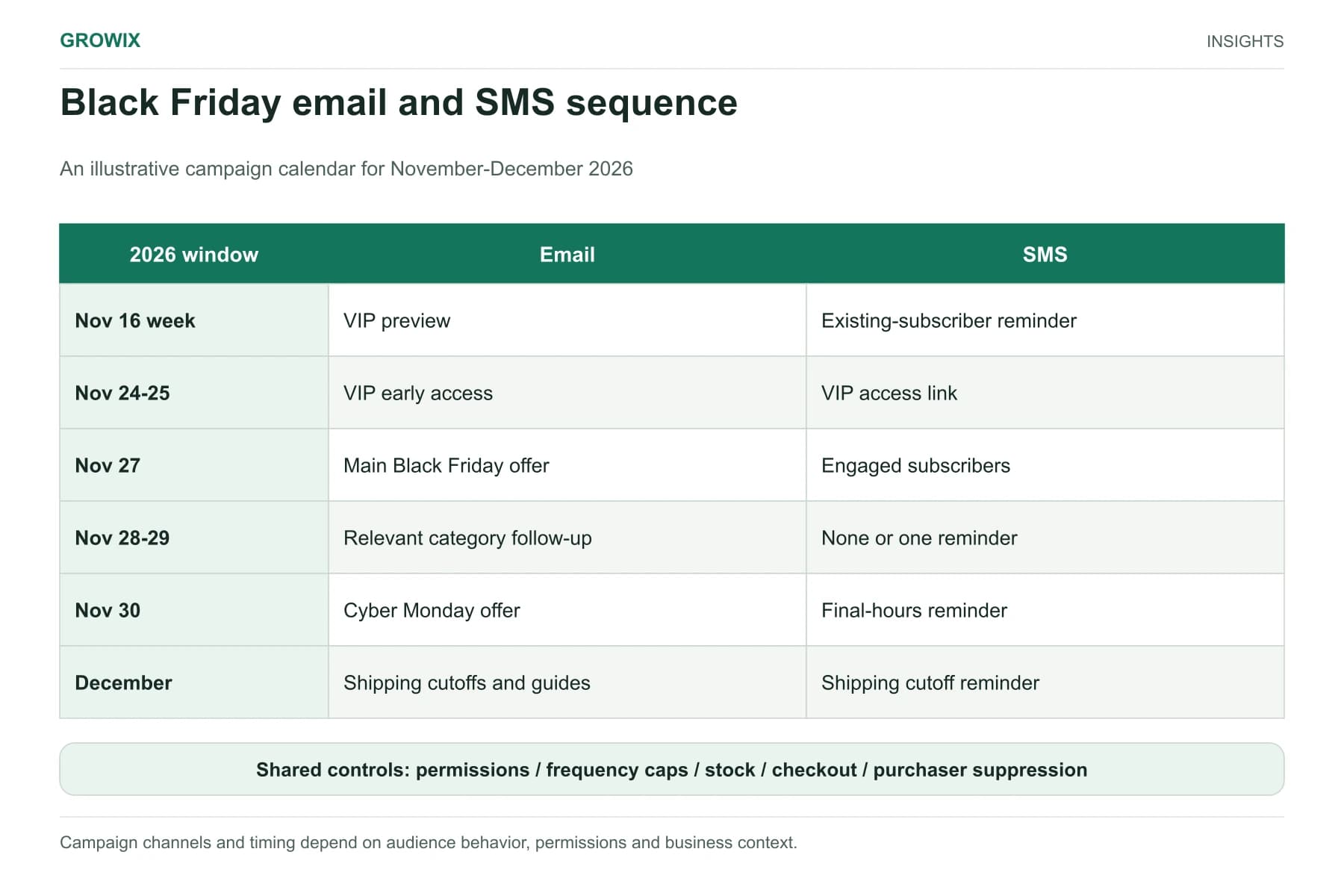
Before peak periods such as Black Friday, raise volumes gradually in the weeks before rather than tripling them on the day. Our Black Friday email and SMS checklist covers the campaign side.
Step 5: Test and monitor inbox placement
Before sending:
Send test messages to seed accounts at Gmail, Outlook and Yahoo, or use an inbox placement testing tool, and check whether they land in the inbox, the promotions tab or spam.
Check authentication results in the message headers.
Check every link and image, and make sure links point to your own domain or a reputable, branded tracking domain.
Ongoing monitoring:
Google Postmaster Tools for spam rate, authentication and compliance status with Gmail's requirements.
Microsoft's Smart Network Data Services (SNDS) for data on mail sent from your IP addresses to Outlook.
DMARC reports for authentication failures and unauthorized senders.
Your platform's bounce and complaint data by mailbox provider, not just in total.
Delivered is not the same as in the inbox. Authentication is necessary; reputation, engagement and provider filtering also affect inbox placement. View full size
Hypothetical example: an online store before peak season
The following scenario is invented for illustration.
An online homeware store sends weekly promotions to 120,000 subscribers. Clicks from Gmail recipients have fallen by a third, while other providers are stable. Postmaster Tools shows a spam rate around 0.25% on promotion days.
The team finds that 45,000 subscribers have not clicked in over a year and that pop-up sign-ups did not say how often emails would arrive. It sends a re-engagement sequence to the inactive group and stops mailing those who do not respond, adds frequency information to sign-up forms, introduces a welcome email and moves inactive subscribers to a monthly digest. It also adds DMARC to the sending domain and moves receipts to a separate subdomain. It then raises volume gradually before its peak promotions and watches spam rate by provider daily.
Measures to watch
Spam complaint rate by mailbox provider, against Google's recommended 0.10%.
Inbox placement from seed or panel tests.
Hard bounce rate by list source.
Click rate and revenue or pipeline per email, rather than open rate alone.
Authentication pass rates from DMARC reports.
Content and formatting that help
Content matters less than reputation and authentication, but it still plays a part:
Use a recognizable sender name and a consistent From address, so recipients know who you are.
Keep the subject line honest. Misleading subject lines raise complaints and can breach commercial email rules.
Balance images and text, include alt text, and avoid sending a single large image with no text.
Use few, consistent link domains, ideally your own, and avoid public link shorteners.
Include a physical postal address and a clear unsubscribe link in marketing messages.
Keep transactional messages focused, with limited promotional content, so they remain clearly transactional.
Frequently asked questions
What is email deliverability?
Email deliverability is the ability of your messages to reach recipients' inboxes rather than spam folders or being rejected. It depends on authentication, sender reputation, complaint rates, list quality, sending patterns and content.
How do I test whether my emails go to spam?
Send to seed accounts at the main mailbox providers or use an inbox placement testing tool, then check where each message lands. Combine that with ongoing data from Google Postmaster Tools, Microsoft SNDS and your platform's bounce and complaint reports.
Do the Gmail and Outlook rules apply to small senders?
Some rules apply to everyone sending to Gmail, such as SPF or DKIM authentication and a low spam rate. The stricter requirements, including DMARC and one-click unsubscribe, apply to senders of 5,000 or more messages a day. Meeting them anyway is good practice and protects you as volume grows.
Next steps
Check your domain's SPF, DKIM and DMARC records this week, set up Google Postmaster Tools and look at your spam rate by provider. Those three checks reveal most deliverability problems.