Workforce Planning for 2027: How Growing Companies Plan Headcount, Skills and Budget
Workforce Planning for 2027: How Growing Companies Plan Headcount, Skills and Budget
A headcount plan built from department wish lists rarely matches the business plan. Start from the work the strategy requires, then decide which roles to hire, develop, automate or source externally.
Workforce planning is the process of working out the people and skills a business needs to deliver its plans, comparing that with the people and skills it has, and deciding how to close the gap: by hiring, developing existing staff, automating work or using outside capacity. For a growing company, the practical output is a headcount and skills plan for the year, tied to the business plan and budget, with clear triggers for adjusting it.
Many companies skip the analysis and build next year's headcount from department requests. The result is usually a plan that costs more than the budget allows and still leaves critical gaps. This guide sets out a practical workforce planning process for 2027.
Why workforce planning matters now
The work itself is changing. The World Economic Forum's Future of Jobs Report 2025, based on a survey of more than 1,000 large employers, found that employers expect 39% of workers' core skills to change by 2030. AI tools are changing how long tasks take in many roles, which affects how many people a team needs and which skills matter most.
For a growing company, this means two questions sit side by side: how many people will we need, and which skills will those people need to have?
Step 1: Start from the business plan
Begin with the drivers in the 2027 business plan, not with current team sizes. Typical drivers include:
Revenue and customer growth, which drive sales, delivery and support capacity.
New products, markets or locations, which create new roles.
Operational changes, such as automation, new systems or outsourcing.
Known departures, such as retirements, contract ends or expected attrition.
Agree the planning assumptions with leadership and finance before teams build their plans, so everyone works from the same numbers.
Step 2: Model demand by role family
Link each role family to the driver that determines its workload. Customer support scales with customers and contact rates; delivery teams scale with projects or billable hours; sales scales with quota and territory.
Hypothetical example
The following figures are invented for illustration.
A software company expects to grow from 4,000 to 5,000 customers in 2027. Each customer creates about 0.5 support tickets a month, and an experienced support agent handles about 500 tickets a month.
If better self-service and automation reduce tickets per customer by 10%, demand falls to 2,250 tickets a month, or 4.5 agents. The company might add one part-time role or outsourced overflow capacity instead of a full hire. The model makes the trade-off visible.
Step 3: Map current supply and skills
For each team, record current headcount, roles, key skills, expected attrition and anyone likely to move into other roles. Then assess skills, not just numbers:
Which skills does the plan require that you do not have today?
Which roles depend on one person, creating a single point of failure?
Which skills are becoming less important as tools change?
A simple skills matrix, with roles on one side, skills on the other and a rating for current capability, is enough for most growing companies.
Step 4: Decide how to close each gap
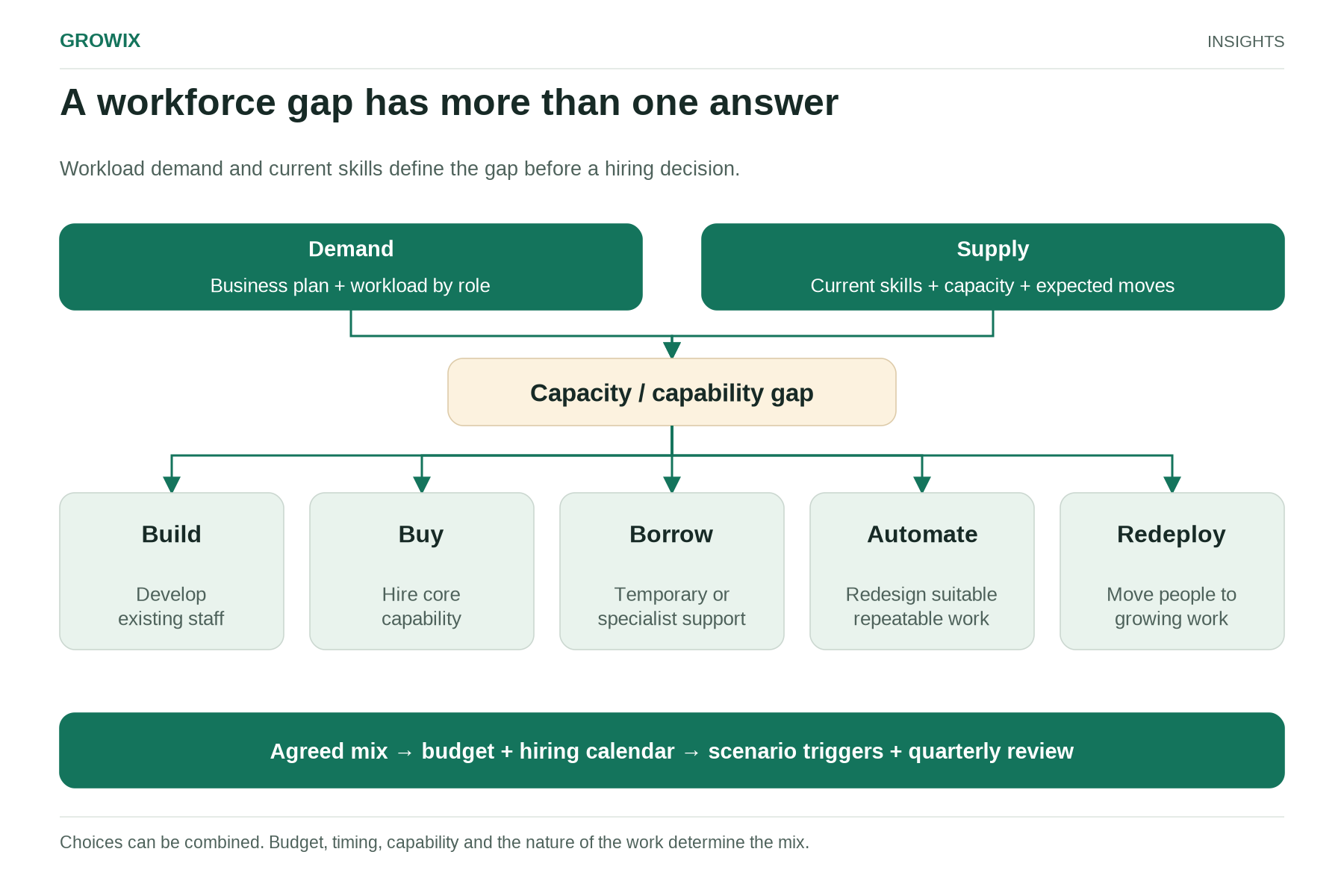
For each gap, choose the right approach:
Option
What it means
Fits when
Build
Develop existing staff through training and new responsibilities
Adjacent skills, time to develop, retention benefits
Buy
Hire permanent employees
Long-term, core capability needed
Borrow
Contractors, staff augmentation or outsourced services
Temporary, specialist or uncertain demand
Automate
Redesign work with software or AI
Repetitive tasks with clear rules
Redeploy
Move people from declining work to growing work
Shifting demand inside the business
Many gaps use a mix. For example, a company might hire a senior data engineer, train two analysts and use a specialist contractor for a migration. For the external options, see our guide to staff augmentation vs dedicated teams vs direct hiring.
A workforce gap has more than one answer. Choices can be combined. Budget, timing, capability and the nature of the work determine the mix. View full size
Step 5: Turn the plan into a budget and hiring calendar
Convert decisions into numbers and dates:
Fully loaded cost per role: salary, benefits, payroll taxes, equipment, software and recruitment costs.
Start dates based on when the work arrives, minus realistic time to hire and onboard.
Phasing: hires spread across the year rather than all in January.
Training and contractor budgets for build and borrow decisions.
Time to hire matters. If a role typically takes several months to fill and another few months for the person to become fully productive, a hire needed for a July launch must start recruitment early in the year. Talk to your recruiters about realistic timelines for each role type.
Step 6: Set triggers and review quarterly
Plans built in November meet reality in March. Agree in advance:
Leading indicators for each role family, such as pipeline, customer growth, ticket volume or utilization.
Triggers that release or pause hires, for example "add the second support hire when tickets exceed 2,300 a month for two months."
A quarterly review with leadership, finance and HR.
This approach lets you hire ahead of demand where it is safe and protect cash when growth is slower than planned.
Plan scenarios, not a single number
Growth rarely arrives exactly as forecast. Build at least three scenarios that match the business plan:
Base case: the hires needed to deliver the expected plan.
Downside: which roles you would pause or delay if revenue grows more slowly, and in what order.
Upside: which roles you would accelerate first, and how you would add capacity quickly through contractors or outsourcing.
Rank planned hires by how essential they are. When conditions change, leaders can then adjust the plan quickly without reopening every decision.
Factor in AI realistically
AI tools may change how much time some tasks take, but the effect varies by role and depends on how work is redesigned. Rather than assuming a fixed productivity gain, run small pilots in the role families where you expect change, measure time and quality for a quarter and build the results into the next planning cycle. Plan training budgets as well: new tools need new skills, and the people who know your customers and processes are often best placed to use them well. Our guide to AI upskilling for professional services teams covers how to structure that training.
A simple workforce plan template
Column
What to record
Role family
For example, customer support or account management
Demand driver
The business measure that determines workload
2027 demand
Required roles or hours based on the driver
Current capacity
Headcount and hours available, after expected attrition
Gap
Demand minus capacity
Approach
Build, buy, borrow, automate or redeploy
Timing
Start date and lead time to fill
Cost
Fully loaded annual cost of the chosen approach
Trigger
The indicator that releases or pauses the hire
Common mistakes
Building from department requests instead of business drivers.
Planning headcount without skills, so new hires repeat existing capabilities.
Ignoring attrition, which can create more openings than growth.
Assuming AI will remove roles without testing how work actually changes.
Hiring everyone in January, creating onboarding overload and early cost.
Responsibilities
Leadership: business priorities and assumptions.
Finance: budget, scenarios and cost per role.
HR and talent acquisition: skills analysis, hiring calendar and recruitment capacity.
Department heads: demand models, skills needs and development plans.
Frequently asked questions
What is workforce planning?
Workforce planning is the process of identifying the people and skills a business needs to deliver its plans, comparing them with the current workforce and deciding how to close gaps through hiring, development, outsourcing, automation or redeployment.
What is the difference between workforce planning and headcount planning?
Headcount planning focuses on the number of roles and their cost. Workforce planning also covers skills, timing, development and alternatives to hiring, so it answers both how many people you need and what they must be able to do.
How often should a workforce plan be updated?
Build it annually alongside the business plan and review it quarterly against leading indicators, adjusting hires when demand changes.
Next steps
Pick your three largest role families and link each to the business driver that determines its workload. Model 2027 demand from that driver and compare it with current capacity. The gaps show where your hiring, training and outsourcing budget should go.