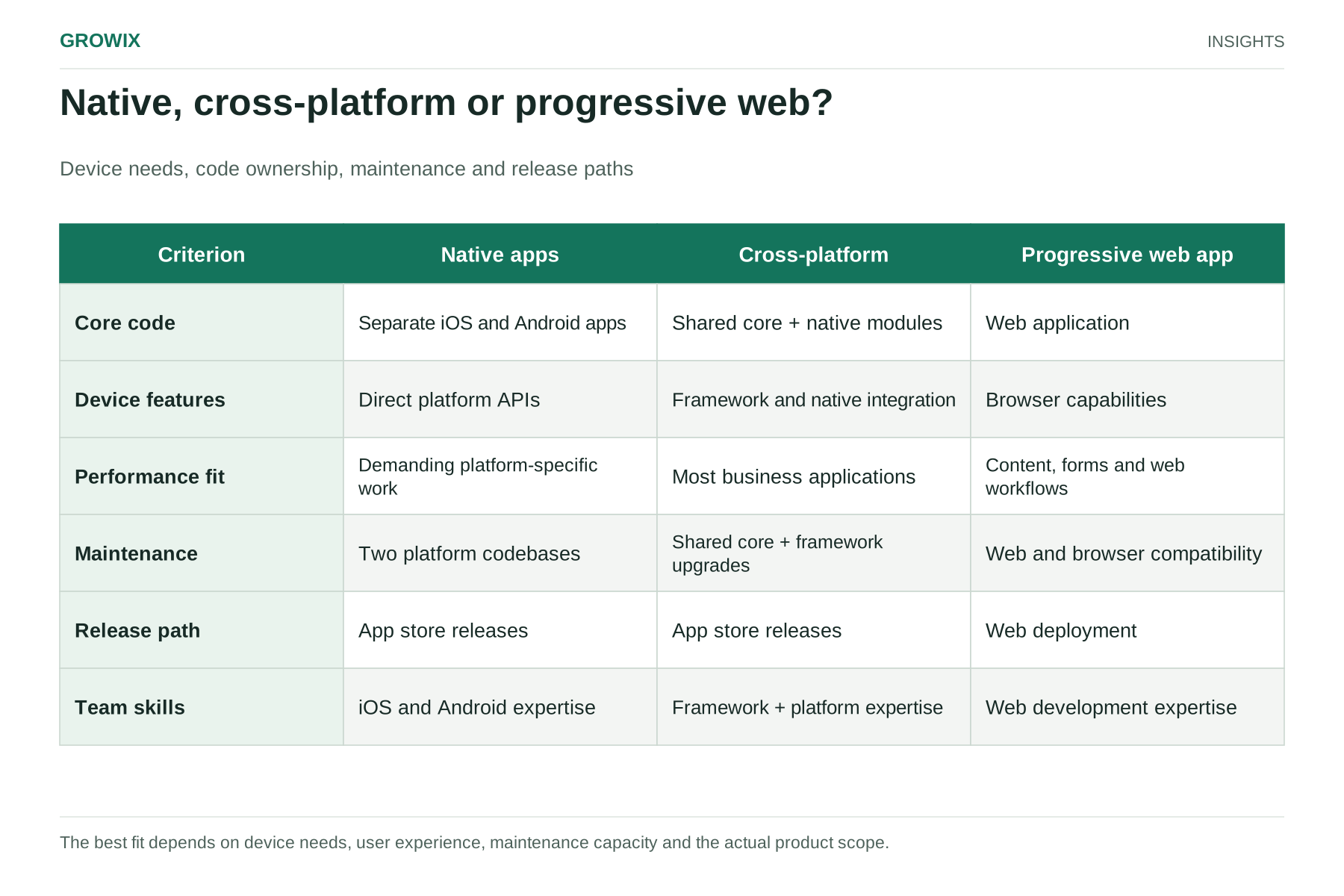
The short answer: for most business apps, such as customer accounts, ordering, bookings, field service tools and internal workflows, a cross-platform framework is the sensible default. It lets one team build for iOS and Android from a largely shared codebase, usually at lower cost than two native apps. Choose native development when the app depends heavily on advanced device features, demanding graphics or performance, the newest platform capabilities on day one, or a platform-specific experience that is central to your brand. Consider a progressive web app when the use is occasional, an app store presence is not essential and the features needed are available in the browser.
Whatever you choose, budget for maintenance. Mobile apps need regular updates to keep working on new operating system versions and to meet app store requirements.
The options defined
Native development. Separate apps written in each platform's own languages and tools, typically Swift for iOS and Kotlin for Android. Each app uses the platform's interface components and has direct access to every device capability.
Cross-platform development. One codebase, largely shared, that produces apps for both platforms. Widely used frameworks include React Native, Flutter and Kotlin Multiplatform, each with a different approach to sharing code and rendering the interface. Platform-specific code is still written where needed.
Progressive web app (PWA). A website built to behave like an app: installable to the home screen, able to work offline to a degree and to send notifications on supported platforms. It runs in the browser rather than being distributed primarily through app stores, and its device access depends on what each platform's browser supports.
How the options compare
| Factor | Native (two apps) | Cross-platform | Progressive web app |
|---|
| Build cost | Highest: two codebases | Lower: one main codebase plus platform-specific work | Lowest for most use cases |
| Time to launch on both platforms | Longest, unless two teams work in parallel | Shorter | Shortest |
| Performance | Best for demanding apps | Good for most business apps | Adequate for content and forms; weaker for heavy interaction |
| Access to device features | Full and immediate | Broad; occasionally needs native modules | Limited by browser support |
| Look and feel | Fully platform-native | Close to native; depends on framework | Web-based |
| New OS features | Available immediately | Often after framework support arrives | Depends on browsers |
| Maintenance | Two codebases to update | One main codebase, plus framework upgrades | One codebase; no store releases |
| Hiring | Separate iOS and Android skills | Framework-specific skills | Web skills |
| App store distribution | Yes | Yes | Optional and limited |
Cost: cheaper, but not half
A common assumption is that one codebase costs half as much as two. In practice, the saving is usually smaller, because design, backend work, testing on both platforms, app store preparation and platform-specific features do not shrink by half.
Hypothetical estimate
The figures below are invented for illustration. Rates are assumptions, not market quotes or Growix pricing. The scope is a business app with accounts, a core ordering workflow, notifications and a connection to an existing backend, built over about 12 weeks.
| Item | Native | Cross-platform |
|---|
| Mobile engineering | 2 platforms × 2 engineers × 12 weeks = 48 person-weeks | 3 engineers × 12 weeks = 36 person-weeks |
| Quality assurance | Half time per platform, 12 weeks = 12 person-weeks | Three-quarter time, 12 weeks = 9 person-weeks |
| Product and interface design | 6 person-weeks | 6 person-weeks |
| Total effort | 66 person-weeks | 51 person-weeks |
| At an assumed $6,000 per person-week | $396,000 | $306,000 |
On these assumptions, cross-platform development costs about 23% less, not 50%. The gap can be larger for simple apps and smaller for apps with substantial platform-specific features. Ask any vendor to show the person-weeks behind a quote, as covered in our guide to MVP development cost.
Modern cross-platform frameworks perform well for the kinds of screens most business apps use: lists, forms, maps, cameras, payments and notifications. Native development remains the safer choice when:
- The app depends on intensive graphics, animation or real-time processing.
- It needs deep integration with platform features such as advanced background processing, specialized sensors, wearables or in-car systems.
- It must adopt new platform capabilities as soon as they are released.
- Battery use and startup time are critical, for example in apps used continuously during a work shift.
Before deciding, list every device feature the app needs and check how well your chosen framework supports each. A single critical gap can tip the decision.
Maintenance: the cost that continues
Mobile apps are never finished. Apple and Google release new operating system versions every year, and app stores set rules that require ongoing work. Google Play, for example, publishes target API level requirements that can affect new submissions, updates and the availability of older apps. Include a recurring review of the current requirement and any extension process in the maintenance plan rather than treating an app-store submission as a one-time task.
Budget for:
- Operating system updates each year, including testing on new devices.
- Framework upgrades for cross-platform apps, which occasionally involve significant changes.
- Dependency and security updates for third-party libraries.
- App store policy changes, such as privacy disclosures and permission rules.
- Backend changes that the app must keep up with.
Many teams plan a fixed monthly allocation or a percentage of the build cost each year for maintenance. Agree how it will be handled before launch.
If you go cross-platform, the framework choice matters for hiring and maintenance more than for features. Questions to ask:
- Team skills: a team strong in JavaScript and React may be productive faster in React Native; a team starting fresh may prefer a framework with its own tooling and interface components; a team with Android expertise may consider sharing business logic through Kotlin Multiplatform while keeping native interfaces.
- Interface approach: some frameworks render with the platform's own components, others draw their own interface. This affects how "native" the app feels and how much work is needed to match each platform's conventions.
- Ecosystem: the availability and maintenance of libraries for payments, maps, analytics and device features you need.
- Upgrade history: how disruptive past major versions have been, and how actively the framework is maintained.
- Code sharing with web: whether you want to share code with an existing web application.
There is rarely a single correct answer. Pick the framework your long-term team can support, not only the one your first vendor prefers.
Hybrid approaches
The choice is not always all or nothing. Some teams build most screens cross-platform and write performance-critical features natively. Others share business logic across platforms while building each interface natively. A mobile website or progressive web app can also complement a native app, serving occasional users while the app serves frequent ones.
Testing and release
Whichever approach you choose, test on real devices, including older and lower-cost models your customers actually use, not just the latest phones on developers' desks. Plan for app store review times, staged rollouts that release updates to a percentage of users first, crash reporting, and a process for urgent fixes. Cross-platform apps still need testing on both platforms; a shared codebase reduces build effort, not the need to check each platform's behavior.
When each approach fits
Choose cross-platform when:
- The app is mainly forms, lists, transactions and standard device features.
- You need both platforms at launch on a constrained budget.
- One team will maintain the app over several years.
Choose native when:
- Performance, graphics or deep device integration are central to the experience.
- The app is your core product and must feel fully platform-native.
- You have, or can fund, separate platform expertise over the long term.
Choose a progressive web app when:
- Use is occasional, such as checking an order or completing a short form.
- An app store listing is not important to your customers.
- Required features work reliably in the browsers your users have.
When Growix may not be the right fit: if your app is a simple, standard use case that a no-code app builder or your existing platform's mobile option can handle, that is usually more economical than a custom build. And if what you really need is a better mobile website, our Web Development team may be the right starting point rather than an app.
A decision checklist
- Which device features does the app need, and does the framework support each well?
- How performance-sensitive is the core experience?
- Do you need both platforms at launch?
- Who will maintain the app in three years, and what skills will they have?
- How important is app store presence to your customers?
- What maintenance budget can you commit to each year?
Frequently asked questions
What is cross-platform app development?
Cross-platform app development uses one largely shared codebase, written with a framework such as React Native, Flutter or Kotlin Multiplatform, to produce apps for both iOS and Android. It suits most business apps built around forms, lists, transactions and standard device features.
Is cross-platform development cheaper than native?
Usually, but not by half. Design, backend work, testing on both platforms and app store releases are needed either way. In this guide's hypothetical estimate, cross-platform comes out about 23% cheaper than two native apps.
Should you choose React Native or Flutter?
Choose the framework your long-term team can support. A team strong in JavaScript and React is often productive faster in React Native, while a team starting fresh may prefer Flutter's own toolkit. Check support for every device feature your app needs before committing.
Next step
Write a one-page description of the app's users, core tasks and required device features, then ask for estimates for both native and cross-platform approaches, with person-weeks and annual maintenance shown separately.
Growix's Mobile App Development team delivers native and cross-platform apps from prototype through store release and updates, and our UI/UX & Product Design team designs the experience on both platforms. If the app is a front end for a customer portal, see our guide to B2B customer portals for distributors.
Discuss your software or AI project